This is the crash course on Yuneta’s persistence layer. At the end you know the difference between timeranger2 (the append-only time-series log) and treedb (the graph database on top), how schemas are declared, how nodes link to each other, and which rules will ruin your day if you ignore them.
Conceptual frame. This document describes the information plane of Yuneta’s typed-graph model. The behavior plane is in
GOBJ.md. The claim that both planes share one set of primitives —topic/gclass,node/gobj,hook/subscription — is laid out in The Typed-Graph Model. Read that first if you want to know why treedb and gobj look so similar before diving into either one.
Companion to GOBJ.md. Sibling to YUNO_LIFECYCLE.md
(which uses these topics to store realms, yunos, binaries and
configurations), YUNO_AUTH.md (which uses them for users, roles
and audit), and REALMS.md (the realm hooks lifecycle).
1. Mental model¶
                ┌───────────────────────────────────────┐
                │     your gclass calls gobj_*node()    │
                └───────────────────┬───────────────────┘
                                    │
                                    ▼
                ┌───────────────────────────────────────┐
                │            c_treedb / c_node          │   gobj wrappers
                │  (graph operations, in-memory hooks)  │
                └───────────────────┬───────────────────┘
                                    │
                                    ▼
                ┌───────────────────────────────────────┐
                │            tr_treedb.c                │   graph layer
                │  topics, nodes, hooks, fkeys, schema  │
                └───────────────────┬───────────────────┘
                                    │
                                    ▼
                ┌───────────────────────────────────────┐
                │            timeranger2.c              │   append-only log
                │  per-key files + md2 binary index     │
                └───────────────────┬───────────────────┘
                                    │
                                    ▼
                              filesystem
                       (one directory per topic,
                        one subdir per key,
                        one .json + .md2 per day)
Two distinct things:
| Layer | What it is |
|---|---|
| timeranger2 | An append-only time-series log with a key index. Stores records keyed by a primary key, time-partitioned, with a 32-byte binary metadata index for fast lookup by rowid, time, or pkey. Knows nothing about graphs. |
| treedb | A graph database that uses timeranger2 as its persistent store. Adds the notion of topics with schemas, typed columns, hooks (parent→children in-memory pointers), and fkeys (child→parent persistent references). |
If you want raw time-series, you go straight to timeranger2. If you want
a graph of typed nodes, you use treedb. The agent uses treedb for
everything: realms, yunos, binaries, configurations, users and roles. The
logcenter yuno uses raw timeranger2 to write records.
2. timeranger2¶
2.1 The on-disk layout¶
For each opened database (a top-level directory):
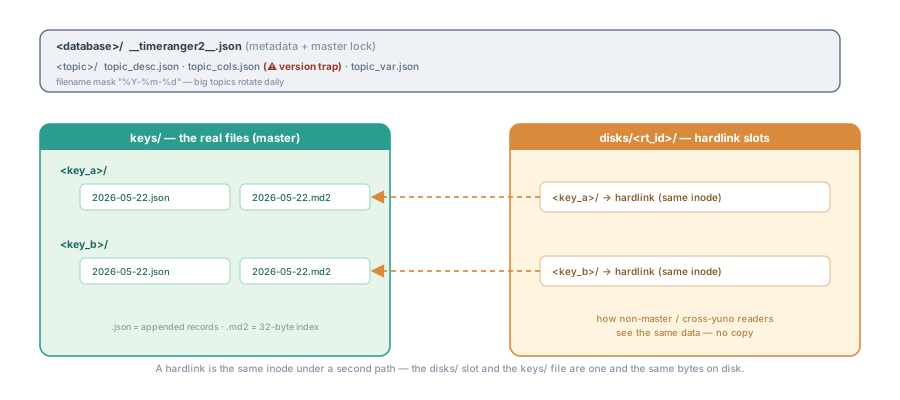
The same layout in text:
<database>/
  __timeranger2__.json                ← metadata + master lock
  <topic_1>/
    topic_desc.json                   ← {topic_name, pkey, tkey, system_flag}
    topic_cols.json                   ← persisted cols schema  ⚠ versioning trap
    topic_var.json                    ← user-mutable per-topic flags
    keys/
      <key_value_a>/
        2026-05-22.json               ← appended JSON records, one per line
        2026-05-22.md2                ← 32-byte binary index, one per record
        2026-05-23.json
        2026-05-23.md2
        2026-05-22.unordered          ← only if a LATE record went into that file
        …
      <key_value_b>/
        …
    disks/                            ← non-master / cross-yuno hardlink slots
      <rt_id>/
        <key_value_a>/                ← hardlinks to the keys/ files
        <key_value_b>/
        …
  <topic_2>/
    …
Path-building lives in kernel/c/timeranger2/src/timeranger2.c.
The data filename mask is "%Y-%m-%d" by default — each appended
record lands in the file whose mask matches its __t__. Big topics
naturally rotate every day.
2.2 Records and the md2 index¶
Each .md2 file is an array of fixed 32-byte records in big-endian
order. The struct (timeranger2.c, in-memory shape
md2_record_ex_t at timeranger2.h):
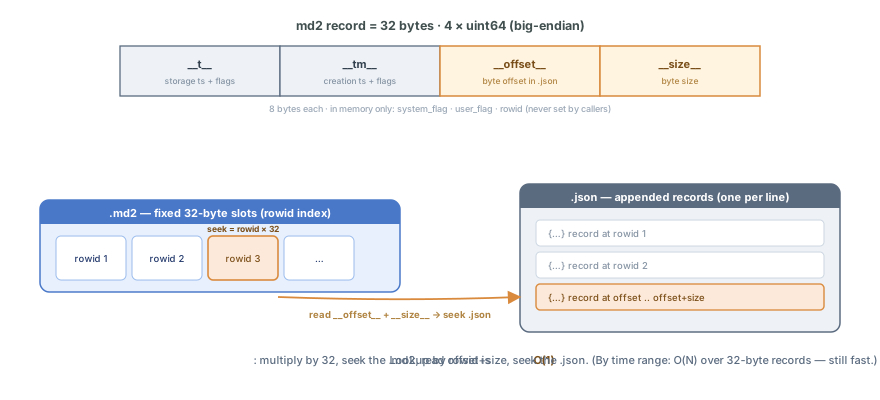
typedef struct {
    uint64_t __t__;         // storage timestamp + high-16-bit user flags
    uint64_t __tm__;        // creation timestamp + high-16-bit system flags
    uint64_t __offset__;    // byte offset of the record in the paired .json
    uint64_t __size__;      // byte size of the record
    // (in memory only:)
    uint16_t system_flag;
    uint16_t user_flag;
    uint64_t rowid;
} md2_record_ex_t;
The high 16 bits of __t__ and __tm__ are reserved for flags. Macros
at timeranger2.c extract and pack them. Lookup by rowid is
O(1) — multiply by 32, seek the .md2, read offset+size, seek the
.json. Lookup by time range is O(N) over .md2 records, which is
still fast, because each record is 32 bytes.
A file’s time range comes from its first and last rows, read at load, and
that is right only while the file is in time order. A record appended with a
__t__ below what its file already holds (a late record: append-record __t__=, a migration, a clock stepping back) breaks that, so the master drops
an empty marker beside the md2, <file>.unordered, and a load reads a marked
file WHOLE to get its real range. Without it, a time-range query skipped the
file after a reload (since 7.25.0). A follower that reads a cell
again from disk keeps the union of the ranges it knew and the ones it read.
Inside a marked file a time-range scan no longer stops at the first row past
the range: it reads the rows of the file, forward and backward, and a paged
iterator’s index does the same (after 7.25.3). A tm condition never ends a
scan: tm is the producer’s time and nothing orders it.
2.3 g_rowid vs i_rowid — the rule¶
Two rowids per record, both maintained only by timeranger2:
| Name | Meaning |
|---|---|
g_rowid | Global rowid for that key — cumulative across all files, never reset |
i_rowid | Rowid within the current .md2 file — (offset / sizeof(md2_record_t)) + 1 |
tranger2_append_record (timeranger2.c:2332) computes both and
returns them in md_record_ex->rowid (timeranger2.c). Callers
never set them. For topics with sf_rowid_key, timeranger2 also
asserts g_rowid == i_rowid (timeranger2.c) — a mismatch is
a data-corruption indicator.
If you write test fixtures and you fill g_rowid by hand, stop. That is
the work of the framework.
2.4 __t__ vs __tm__¶
Both timestamps, but semantically distinct:
| Field | What it means | When it is set |
|---|---|---|
__t__ | When timeranger2 wrote the record to disk | At append time. Defaults to “now”. |
__tm__ | When the underlying event happened (from the record’s tkey field) | Caller-controlled via tkey config. |
__t__ partitions files. __tm__ is the event-time for your queries.
For records that are events as they happen, the two are usually
identical (within milliseconds). For batch imports of historical data
the two diverge — __tm__ is the original event, __t__ is “now I
imported it”.
2.5 Topic declaration¶
When you create a topic you provide a topic_desc_t
(timeranger2.h):
typedef struct {
    const char       *topic_name;
    const char       *pkey;          // primary-key field name
    const system_flag2_t system_flag;
    const char       *tkey;          // time-key field name
    const json_desc_t *jn_cols;       // column schema
    const json_desc_t *jn_topic_ext;
} topic_desc_t;
system_flag bits (timeranger2.h):
| Flag | Meaning |
|---|---|
sf_string_key | pkey is a string. Directory names use it verbatim. |
sf_int_key | pkey is a uint64. Directory names zero-padded. |
sf_rowid_key | pkey is auto-generated rowid. g_rowid == i_rowid enforced. |
sf_t_ms | __t__ in milliseconds (default: seconds). |
sf_tm_ms | __tm__ in milliseconds. |
sf_zip_record | Declared, NOT implemented: both the writer and the reader carry the branch as // TODO. A topic created with it stores the bit and writes plain records. |
sf_cipher_record | Declared, NOT implemented, same as above. |
The two dead flags are reachable since 7.21.0, when tranger2_str2system_flag()
started mapping each name to its own bit (before, every name landed on the bit
of the one before it). Do not declare them: the bit is persisted, and the day
the branch is written it would apply to a store written plain.
Persisted in topic_desc.json at create time (timeranger2.c)
and loaded on open.
2.6 Public API in 12 calls¶
timeranger2.h. Grouped by purpose:
// lifecycle
json_t *tranger2_startup    (hgobj, json_t *jn_tranger, yev_loop_h);
int     tranger2_stop       (json_t *tranger);
int     tranger2_shutdown   (json_t *tranger);
json_t *tranger2_create_topic(json_t *tranger, const char *topic_name,
                              const char *pkey, const char *tkey,
                              json_t *jn_topic_ext, system_flag2_t system_flag,
                              json_t *jn_cols, json_t *jn_var);
json_t *tranger2_open_topic  (json_t *tranger, const char *topic_name, BOOL verbose);
int     tranger2_close_topic (json_t *tranger, const char *topic_name);

// append
int     tranger2_append_record(json_t *tranger, const char *topic_name,
                               uint64_t __t__, uint16_t user_flag,
                               md2_record_ex_t *md_record_ex, json_t *jn_record);

// read
json_t *tranger2_open_iterator    (json_t *tranger, const char *topic_name, const char *key,
                                   json_t *match_cond, tranger2_load_record_callback_t,
                                   const char *iterator_id, hgobj creator, json_t *data, json_t *extra);
json_t *tranger2_iterator_get_page(json_t *tranger, json_t *iterator,
                                   uint64_t from_rowid, int limit, BOOL backward);
int     tranger2_close_iterator   (json_t *tranger, json_t *iterator);

// realtime
json_t *tranger2_open_rt_mem (…);   // master-side realtime (writes pushed via callback)
json_t *tranger2_open_rt_disk(…);   // non-master realtime (watches hardlinks)
tranger2_open_rt_disk is the workhorse for cross-yuno reads —
see §4.5.
2.6b The two time axes (t and tm)¶
Every record carries two timestamps, and they are independent:
| Axis | Meaning | Its source |
|---|---|---|
t | Persistence time — when the record was appended | the __t__ argument of tranger2_append_record (now, if 0) |
tm | Message time — when the event it carries happened | the record’s tkey field (usually tm), set by the producer |
They diverge whenever data is backfilled or a device uploads a buffer late.
Both are in the topic’s unit: seconds, or milliseconds when the topic
sets sf_t_ms / sf_tm_ms (read system_flag from the topic desc — over the
wire, topics expanded=1).
The match_cond of an iterator takes a range on each axis (from_t and
to_t, from_tm and to_tm), the from_rowid and to_rowid pair, and
the user_flag conditions,
and ANDs them. Every condition is honored per record: a filtered paging
iterator builds its row index when it opens, so tranger2_iterator_size(),
pages and the pages themselves count only matching records — and
get_page’s from_rowid is then a position among the matching rows, not a
global rowid. An unfiltered iterator builds no index (its open stays cheap
regardless of key size) and its positions are the global rowids.
list-keys reports, per key, records plus the key’s span on both axes
(fr_t/to_t, fr_tm/to_tm), read from the topic’s in-memory cache totals —
so a client can bound a time picker to the content of the key, and it reads
no record.
Note (in the md2 record, times carry flags). On disk the 16 high bits of
__t__hold theuser_flagand those of__tm__thesystem_flag. Always read them throughget_time_t()orget_time_tm(). The raw field gives you a timestamp that still contains the flags.
2.7 Master / non-master¶
Exactly one process owns a store for writing:
The master can read AND write. Only the master can call
tranger2_append_record,tranger2_delete_topicand the other write functions.Non-masters can only read. They are expected to use
tranger2_open_rt_diskso the master can push updates to them via hardlinks in thedisks/<rt_id>/directory.
The role comes from the configuration, not from a start-up race. The
master attr of the yuno’s config goes directly to
tranger2_startup, and only a yuno configured as master
opens __timeranger2__.json in exclusive mode
(timeranger2.c:443).
A yuno configured master: false never competes for the lock: it opens the
file in shared mode and stays a replica, whatever the start order. To move the
mastership of a store, change the configuration. Do not change the order of the
restarts.
A configured master that finds the store locked stops. It does not become a
replica. The exclusive probe fails and logs a CRITICAL that carries
on_critical_error, which is 2 (LOG_OPT_EXIT_ZERO) by default and is
hardcoded to that value by C_AUTHZ. That CRITICAL calls exit(0) inside the
log, before the non-master fallback below it. The exit code 0 is deliberate:
the watcher does not relaunch a clean exit, so the second instance stays down
and the store keeps exactly one owner. The fallback that opens the file in
shared mode and clears the flag is reached only when on_critical_error is
0 — a read-only replica that is configured to run non-master.
The lock is held for the lifetime of the process. If a master crashes, the OS releases the flock on exit, and the next yuno configured as master takes the store.
The flag is per tranger, not per yuno: one yuno is routinely the master of
its treedb_system_schema and a replica of a data treedb that it shares with
another yuno.
db_history_ce (1620):  "Authz.master": true    → master of the authzs store
gate_central  (2020):  "Authz.master": false   → replica of the same store
Asking a running yuno: treedb-info. Until 7.13.0 the flag was not
reachable from the control plane at all — it is an SDF_RD attr of the
tranger, absent from services, from treedbs and from the stats, so the only
place it surfaced was the whole print-tranger dump. C_NODE answers it now:
ycommand -c 'command-yuno id=<yuno> service=<treedb> command=treedb-info'
{
    "treedb_name": "treedb_authzs",
    "master": false,
    "schema_version": 19,
    "topics": ["__snaps__", "__graphs__", "__assets__", "__icons__", "roles", "users", "users_accesses"]
}
schema_version is the treedb’s own __schema_version__ inside the tranger
(written by treedb_open_db), and it is what tells a client whether the schema
it is looking at is the one it knows — a change of cols must bump it, or the
persisted topic_cols.json masks the new in-memory schema (§3.4).
Writing to a replica is refused, and used to be silent. create-node,
update-node, delete-node, link-nodes, unlink-nodes and import-db on a
non-master C_NODE now answer
ERROR -1: gate_central^2020: treedb 'treedb_authzs' is READ-ONLY, this yuno is not the master of its trangerBefore 7.13.0 they answered success: the node was built in the in-memory
treedb, tranger2_append_record’s own “NO master” guard was never reached
(a non-master treedb does not attempt the append), nothing was logged, and the
row was gone at the next reload. An editor showed a saved record that was
already lost. The check runs before the authz check on purpose: on a replica
nobody can write, whoever they are, and a -403 would send an operator looking
for a permission that would not help.
From C too, before anything moves. gobj_update_node() (except a
volatil one, which writes memory only), gobj_link_nodes(),
gobj_unlink_nodes() and gobj_delete_node() on a replica return NULL /
-1 and log “Cannot write a node / link nodes / unlink nodes / delete a node
on a READ-ONLY replica”; gobj_create_node() is refused by
treedb_create_node() itself. In 7.25.4 link, unlink and a forced
delete moved the links in MEMORY first and met the refused save last: the
caller got -1 and the replica’s memory said what its disk did not.
/*  On a replica: -1, and item01 keeps the parent it had  */
int ret = gobj_link_nodes(gobj_node, "children",
    "items", json_pack("{s:s}", "id", "item00"),
    "items", json_pack("{s:s}", "id", "item01"),
    src);
A master that lost its lock is a replica. When a stopped master finds its
store taken by another process, timeranger2 leaves its tranger a replica
(master false, master_lost true). The services on top follow what the
tranger IS: C_TRANGER’s master attribute reads false and its feeds open
as a replica’s (rt_disk), and C_TREEDB’s treedbs command reports
master per treedb:
ycommand -c 'command-yuno id=<yuno> service=treedbs command=treedbs'
# [{"treedb_name": "treedb_system_schema", ..., "master": false},
#  {"treedb_name": "treedb_authzs", ..., "master": true}]
2.8 Snapshots¶
The current timeranger2 API does not expose a snapshot primitive
named tranger2_*_snap* — those calls live one layer up at the treedb
level (treedb_shoot_snap() / treedb_activate_snap()). The closest
underlying mechanism is the disks/<rt_id>/ hardlink trick that gives
non-masters a consistent view at the point the directory was wired.
What timeranger2 lends to it is one field: the md2 user_flag of a record,
which the treedb layer uses as the snap’s tag. Only shoot-snap writes
it, in place, and a record is tagged once. The whole behaviour — what a
snap writes, what an activated snap reads, what happens to writes made
meanwhile, and what a snap protects from a delete — is §3.9.
2.9 The delete-record story¶
Two granularities, both implemented in v7 as of 2026-05-26.
Whole record (= a primary key + every instance under it).
tranger2_delete_key()(renamed fromtranger2_delete_recordon 2026-05-25. A#defineintimeranger2.hkeeps the legacy alias). Removeskeys/<key>/and drops the key fromtopic_cache. Irrecoverable. Used today bytreedb_delete_node.One instance (one row in the
.md2file).tranger2_delete_instance(tranger, topic, key, __t__, rowid, zero_payload)mutates the.md2row in place withsf_deleted_instance = 0x0400(back insystem_flag2_t, inherited side of the mask sort_by_diskfollowers see the tombstone). Optionalzero_payloadoverwrites the matching__size__bytes in the data.jsonfor sensitive-data wipes. Read paths (tranger2_open_iteratorhistory,tranger2_iterator_get_page,publish_new_rt_disk_records) skip dead rows. Master-only, idempotent. Slot ids do NOT renumber —iterator_size/total_rowskeep counting slots, not live rows. Treedb uses it:treedb_delete_instance()drops onepkey2slot in memory AND calls it on every md2 row of that(id, pkey2 value), so the instance stays deleted after a reopen.
Propagation to subscribers (2026-05-26)¶
tranger2_delete_key() now notifies every subscriber tracking
the deleted key. Two paths:
In-process (rt_mem, rt_disk in the same yuno as the master, open_iterator): a registered
tranger2_key_deleted_callback_tfires for each handle whosekeyfilter matches (""= any).Across-process (
rt_by_diskfollowers): the masterrmrdirstopic/disks/<rt_id>/<key>/BEFORE the livekeys/<key>/so the follower’s inotify watcher catches it asFS_SUBDIR_DELETED_TYPE, which fires the follower’skey_deleted_callback.fire_key_deleted_locally()is split by transport (fs_followersflag): the master in-process call serves non-watcher subscribers, the inotify branch serves the fs-watcher followers — each subscriber fires exactly once. No new IPC channel, no new file convention. (The inotify branch firing the fs-watcher callbacks was completed 2026-05-28. Before that date the shared distribution skipped them, and live deletes were dropped with no message. See the CHANGELOG.)
Register with:
tranger2_set_rt_key_deleted_callback(handle, cb, user_data);…on any handle returned by tranger2_open_rt_mem,
tranger2_open_rt_disk or tranger2_open_iterator. Pre-2026-05-26
followers that polled their cache on a timer can drop the timer.
Memory: project_tranger2_delete_record_deferred.
2.10 Durability¶
tranger2_append_record performs the write but does not fsync
(timeranger2.c). Durability is whatever the OS gives you —
on EXT4 with the default journal, that is “data on disk within the
journal commit interval, usually 5 s”. If you need stronger guarantees,
add an explicit fsync in the wrapping code, but understand the
throughput cost.
3. treedb¶
3.1 The graph model¶
A treedb sits inside a tranger. Topics become entity types, nodes
become records keyed by id, hooks are in-memory pointers from parent
nodes to their children, fkeys are persistent references from child
nodes to their parent. Schema is JSON.
The schemas already documented in this repo’s docs cover the canonical examples:
YUNO_LIFECYCLE.md§2.1-2.3 —binaries,configurations,yunos.REALMS.md§2 —realms.YUNO_AUTH.md§4.1 —users,roles,users_accesses.
Read those for the operational shape. This section explains how the schema works.
3.2 Topic schema JSON¶
A real, minimal example (the yuno_agent schema, cut down to one topic). Two
versions live at two levels: schema_version is the TREEDB’s (§3.1, §3.4),
topic_version is each topic’s own:
{
  "id":             "treedb_yuneta_agent",
  "schema_version": "24",
  "topics": [
    {
      "id":            "yunos",
      "topic_version": "20",
      "pkey":          "id",
      "pkey2s":        "yuno_release",
      "tkey":          "",
      "system_flag":   "sf_string_key",
      "cols": {
        "id":         { "type": "string", "flag": ["persistent", "required", "rowid"] },
        "realm_id":   { "type": "string", "flag": ["persistent", "fkey"] },
        "yuno_role":  { "type": "string", "flag": ["persistent", "required"] },
        "configurations": { "type": "object", "flag": ["hook"],
                            "hook": { "configurations": "yunos" } }
      }
    }
  ]
}
Six things to notice:
pkey— column name that serves as the primary key. Maps totopic_desc_t.pkey.pkey2s— optional secondary key (composite). Allows multiple records per primary key, for example several versions of a binary.treedb_get_instance(),treedb_list_instances()and the agent’sinstancescommand query them. Invariant: the slot of the primary’s pkey2 value holds the SAME node object as the primary index, so a pkey2 lookup of that value answers the primary (C_NODE’s delete of a node relies on it).treedb_save_node()points the slot again on every runtime save (since dbf532ec9; before, a runtimeupdate-nodewas invisible throughlist_instancesuntil the next reload -- the bug behindlist-binariesshowing a stale binary right afterupdate-binary). The load keeps it too since 7.25.5: up to 7.25.4 it built that slot from its own record, a second object with no links, until the first save of the primary re-pointed it. An update through the instance lookup after a restart changed that copy: the primary kept the old values, and its next save wrote them back over the new ones. That save also dropped the copy, so a caller still holding the instance pointer held freed memory. A save keeps it since 7.25.5 too: a node whose pkey2 value was changed in place (an update refuses it) is refused bytreedb_save_node()while another slot of its key holds it -- the record would be a new instance on disk, and changed onto the value of the primary, the save re-pointed the primary’s slot to it. And a create indexes the value its record holds (a column’sdefault), not the raw value of its kw. Two more cases keep it after 7.25.4: with more than one pkey2, a save of an instance no longer takes a slot the primary holds (the values they share); and a create that makes the primary of a key that had instances and no primary -- what a snap active shows of a key created after it: the id index holds what the snap tagged, the secondary indexes are not filtered -- takes the slot of its value, where the slot kept the loaded object, a second one of the same instance (C_NODE’s delete of it then tombstoned the rows through that object before the delete of the key was refused).schema_versionandtopic_version— these are different. Schema is the overall layout. Topic is per-topic. Raisetopic_versionevery time you changecols— §3.5.colsdeclares typed columns. Type + flag list (next section).fkeyfield on the child points at (parent topic, hook name). Persisted.hookfield on the parent points at (child topic, child fkey name). Rebuilt in-memory at load time.
Two optional topic keys are not in the example, because yunos needs
neither:
system_topic: true— the topic cannot be deleted, not even withforce. See §3.10.main_topic: true— the topic that the tree of the treedb hangs from (since 7.19.0). Viewers use it: the treedb graph opens its tree from this topic. Only a topic with a hook to itself can carry the mark (places inside places), and only one topic per treedb.treedb_open_db()logs a mark that breaks a rule and ignores it. Like any change to a topic, the mark is published by raising thetopic_versionof that topic, and theschema_versionof the treedb when the runtime must use it. See §3.11.
An example of the mark, as a C schema literal. Places hold places, and each place holds devices:
static char treedb_schema_sample[]= "\
{                                                                   \n\
    'id': 'treedb_sample',                                          \n\
    'schema_version': '1',                                          \n\
    'topics': [                                                     \n\
        {                                                           \n\
            'id': 'places',                                         \n\
            'pkey': 'id',                                           \n\
            'system_flag': 'sf_string_key',                         \n\
            'topic_version': '1',                                   \n\
            'main_topic': true,                                     \n\
            'cols': {                                               \n\
                'id': {                                             \n\
                    'header': 'Id',                                 \n\
                    'type': 'string',                               \n\
                    'flag': ['persistent', 'required']              \n\
                },                                                  \n\
                'children': {                                       \n\
                    'header': 'Children',                           \n\
                    'type': 'dict',                                 \n\
                    'flag': ['hook'],                               \n\
                    'hook': {                                       \n\
                        'places': 'parent'                          \n\
                    }                                               \n\
                },                                                  \n\
                'parent': {                                         \n\
                    'header': 'Parent',                             \n\
                    'type': 'string',                               \n\
                    'flag': ['fkey']                                \n\
                },                                                  \n\
                'devices': {                                        \n\
                    'header': 'Devices',                            \n\
                    'type': 'dict',                                 \n\
                    'flag': ['hook'],                               \n\
                    'hook': {                                       \n\
                        'devices': 'place'                          \n\
                    }                                               \n\
                }                                                   \n\
            }                                                       \n\
        },                                                          \n\
        {                                                           \n\
            'id': 'devices',                                        \n\
            'pkey': 'id',                                           \n\
            'system_flag': 'sf_string_key',                         \n\
            'topic_version': '1',                                   \n\
            'cols': {                                               \n\
                'id': {                                             \n\
                    'header': 'Id',                                 \n\
                    'type': 'string',                               \n\
                    'flag': ['persistent', 'required']              \n\
                },                                                  \n\
                'place': {                                          \n\
                    'header': 'Place',                              \n\
                    'type': 'string',                               \n\
                    'flag': ['fkey']                                \n\
                }                                                   \n\
            }                                                       \n\
        }                                                           \n\
    ]                                                               \n\
}                                                                   \n\
";
The hook places.children points at places itself, through the fkey
parent. That self-hook is what lets places carry the mark. Put the same
mark on devices and treedb_open_db() logs an error and ignores it:
devices has no hook to itself. The parentless places are the roots of the tree, and the devices
hang from their place.
3.3 Column types and flags¶
Column types live in the JSON spec, parsed by tr_treedb.c. There
are nine, and the __system__ treedb refuses any other: string,
integer, real, boolean, object / dict, array / list, blob.
enum, wild, email, url, password and time are flags on one of
those types, never a type:
'status': {
    'header': 'Status',
    'fillspace': 10,
    'type': 'string',
    'flag': ['persistent', 'enum'],
    'enum': ['on', 'off']
}
The keys of a topic are declared on the topic, not with a column flag:
pkey (always id), pkey2s for the secondary keys, tkey for the time
key:
{
    'id': 'yunos',
    'pkey': 'id',
    'pkey2s': 'yuno_release',
    'tkey': '',
    'cols': { ... }
}
Flags (parsed by kw_has_word throughout tr_treedb.c):
| Flag | Effect |
|---|---|
persistent | Written through to timeranger2 on save. |
required | Cannot be null at creation. |
notnull | Cannot be null ever. |
hook | Parent → children link. In-memory only (rebuilt on load from children’s fkeys). Never on the same column as fkey: the schema is refused. A link that would hang a node from its own descendant through the SAME hook is refused (a tree is a tree); a cycle through two different hooks is accepted. |
fkey | Child → parent reference. Persisted. Encoded as topic^parent_id^hook_name. A node that is also a parent carries its hook in ANOTHER column. |
uuid | On the id column: a create that sends no id gets a random UUID. |
rowid | On the id column: a create that sends no id gets one past every id the topic ever handed out. Never reused. |
qualified | On the id column: a create that sends no id gets the id of its parent, a dot, and its own name. |
password | Treated as opaque secret on inspection. |
email/url/enum/wild | Semantic types, mostly informational. |
inherit | Inherits a value from a related node. |
time/now | The column holds an instant (an integer epoch). now means the CLOCK writes it, whatever the kw says, on EVERY write — the create and every update, writable or not, persistent or volatile: when this record was last written. A time column WITHOUT now gets the clock at the create when the kw brings no value, and an update leaves it alone: when this record was born. (7.24.0 stamped a now column on an update only if it was writable; since after 7.24.1 writable plays no part.) |
Absence of persistent + absence of hook/fkey means volatile —
in-memory only.
The whole vocabulary a column may carry is the enum of the flag column of
treedb_system_schema.c, and a flag outside it is refused: persistent,
required, notnull, wild, inherit, readable, writable, hidden,
stats, rstats, pstats, hook, fkey, enum, template, uuid,
rowid, qualified, password, email, url, time, now, date,
color, image, icon, file, tel, table, id, currency, hex,
binary, percent, base64, coordinates, gbuffer. There is no pkey,
pkey2 or tkey flag.
uuid, rowid and qualified are the three ways the store hands a key
out, and a column carries at most one of them. All three sit on the id
column, and all three act only when the create sends no id: an id in the
kw is always kept as it is. They are not equivalent.
uuidgives an address that is unique everywhere and means nothing to a person.rowidgives one past every id the topic ever handed out, kept in the topic’stopic_var.jsonaslast_rowid_id, and never reused, not even after its node is deleted (a snap’s id rides the records it tagged). That address is unique but arbitrary: it does not reproduce, and arowidpkey has no update, so an editor that saves a record appends a second one instead of changing the first. It is here for the stores that already use it. Do not declare it in a new topic.qualifiedgives a name: the id of the parent, a dot, and the name of the record. The name is the first secondary key of the topic (pkey2s), and the parent is the one named in the fkey of the kw. Full story in §3.11.
qualified has three conditions. treedb_create_node()
logs the cause and creates nothing when one of them is not true:
The topic declares
pkey2s, and the kw carries that field. That field is the name.The kw carries an fkey with a parent. A
qualifiedrecord is always the child of something.The composed id is not longer than a record key (
RECORD_KEY_VALUE_MAX). A key too long is refused, never trimmed: a truncated id is the address of another node.
The separator is a dot, and it cannot be ^. That is the character an fkey
reference is split on, so an id that carries one makes every reference to that
node undecodable (§3.11).
icon names an icon, and the user’s own icons are data: __icons__. An
icon column holds the class name of an icon of the GUI’s set (yi-bolt).
Since 7.26.7 every treedb also has the system topic __icons__, created at
open like __assets__: one node per icon a user adds, its id the name and
svg the drawing. An icon column names one of them as yi-u-<id>, a
namespace no icon of the library uses, so a user icon never replaces one.
/*  The column, in the schema of the topic that shows an icon  */
'icon': {
    'header': 'Icon',
    'type': 'string',
    'flag': ['icon', 'writable', 'persistent']
}
# transformer.json:
# {"id": "transformer", "svg": "<svg viewBox='0 0 24 24'><path d='M4 4h16v16H4z'/></svg>"}
ycommand -c 'command-yuno id=<yuno> service=<treedb> command=create-node topic_name=__icons__ content64=$$(transformer.json)'
# then a node of the topic with the column names it: "icon": "yi-u-transformer"The treedb stores the svg and checks nothing in it. The GUI rebuilds it from
its shapes before it draws it (gobj-ui yui_svg_sanitize()), because any
writer with the right to write a node can write one. __icons__ is never
tagged by a snap: an activated snap keeps every icon, so a record it froze
still finds the icon it names.
3.4 The __md_treedb__ metadata block¶
Every loaded node carries a metadata sidecar (tr_treedb.c,
attached at tr_treedb.c):
"__md_treedb__": {
    "treedb_name": "treedb_yuneta_agent",
    "topic_name":  "yunos",
    "g_rowid":     14,
    "i_rowid":     14,
    "t":           1737499200,
    "tm":          1737499200,
    "tag":         0,
    "pure_node":   true
}g_rowid,i_rowid— see §2.3. Never set them yourself.t,tm— the timeranger2 timestamps, surfaced to the node level.tag— user_flag from md2: the snap that froze this record, 0 for a record no snap holds (§2.8).immutable— present only when set (omitted on ordinary nodes).truemeans the record carries thesf_immutable_recordmd2 bit and cannot be deleted. See §3.10.pure_node— true for ordinary nodes. This is the metadata that you read.
A node that appears in multiple places in a JSON dump (once under the
topic’s id index, once nested inside its parent’s hook) carries the
same __md_treedb__ everywhere. Same record, multiple views.
3.5 The topic_cols.json versioning trap¶
Memory
feedback_treedb_schema_versioning:
Any
colschange needs a highertopic_version. If you do not raise it, the persistedtopic_cols.jsoncontinues to mask the new schema. Deletestore/when you reproduce the problem.
What happens: treedb_open_db() (tr_treedb.c:485) reads the
persisted topic_cols.json and compares its topic_version against
the schema in code. If they match, the persisted file wins. If you
edited the schema in code but forgot to bump topic_version, your
running yuno sees the old schema and silently ignores any new
columns you added.
The fix:
Bump
topic_versionin the schema JSON every time you changecols.While debugging schema problems, wipe the topic’s directory in
store/to force a clean load.
One change does NOT wait for the bump: a schema whose columns are the same
and say the same things, in a different order. The freeze exists so that a
change to what a column declares cannot arrive unannounced; an order declares
nothing new, so tranger2_create_topic() rewrites the file for it (§3.11).
3.6 Node CRUD: the public API¶
Two layers — treedb_* (the low-level graph API) and gobj_*node (the
gobj wrappers most user code uses).
Low-level (tr_treedb.h):
json_t *treedb_create_node(json_t *tranger, const char *treedb_name,
                           const char *topic_name, json_t *kw);
json_t *treedb_update_node(json_t *tranger, json_t *node, json_t *kw, BOOL save);
int     treedb_delete_node(json_t *tranger, json_t *node, json_t *jn_options);
json_t *treedb_get_node   (json_t *tranger, const char *treedb_name,
                           const char *topic_name, const char *id);
json_t *treedb_list_nodes (json_t *tranger, const char *treedb_name,
                           const char *topic_name, json_t *jn_filter,
                           BOOL (*match_fn)(json_t *node, json_t *jn_filter));

// links (graph operations)
int     treedb_link_nodes  (json_t *tranger, const char *hook_name,
                            json_t *parent_node, json_t *child_node);
int     treedb_unlink_nodes(json_t *tranger, const char *hook_name,
                            json_t *parent_node, json_t *child_node);
gobj-level wrappers (gobj.h):
json_t *gobj_create_node(hgobj, const char *topic, json_t *kw, json_t *opt, hgobj src);
json_t *gobj_update_node(hgobj, const char *topic, json_t *kw, json_t *opt, hgobj src);
int     gobj_delete_node(hgobj, const char *topic, json_t *kw, json_t *opt, hgobj src);
json_t *gobj_list_nodes (hgobj, const char *topic, json_t *filter, json_t *opt, hgobj src);
int     gobj_link_nodes  (hgobj, const char *hook,
                          const char *parent_topic, json_t *parent_rec,
                          const char *child_topic,  json_t *child_rec, hgobj src);
int     gobj_unlink_nodes(hgobj, const char *hook,
                          const char *parent_topic, json_t *parent_rec,
                          const char *child_topic,  json_t *child_rec, hgobj src);
Most production code calls gobj_*node. Those functions route to the right
treedb from the priv of the gobj, and they integrate the authzs and the
traces.
What a write validates (since 7.13.0 — before it, less than this):
| create | update | |
|---|---|---|
| Type of each field, per the topic’s cols | yes | yes |
required on a missing field | yes | n/a (the node already has one) |
notnull | yes | yes |
enum membership | yes | yes |
| A pkey2 value | names the instance | must not change (refused) |
A now column | stamped | stamped |
The now row is the one exception to “only the fields the kw carries are
normalized”: no kw ever carries a now column, because the whole point of
the flag is that the clock writes it and not the caller. Until 7.24.0,
__graphs__.time — the instant a treedb layout was saved — kept the instant
of the FIRST save for the life of the record. 7.24.0 made writable the gate,
and every “Update Time” of the projects, declared without it, stayed frozen at
the create. Now the two meanings are two flags: now is when it was last
written (__graphs__.time), and a time column without now is when it was
born (__assets__.t, the instant the bytes arrived — a rename of the asset
leaves it alone).
'updated': {
    'header': 'Update Time',
    'type': 'integer',
    'flag': ['persistent', 'time', 'now']   /*  every write stamps it  */
},
'created': {
    'header': 'Create Time',
    'type': 'integer',
    'flag': ['persistent', 'time']          /*  the create stamps it  */
}
An update used to store whatever it was handed: no type, no notnull, no
enum. And enum was checked only when a schema was parsed, never when a
node was written, so the list a column declares did not survive the first
write — on either path. Both now run the same normalization, and an update
validates every incoming field before touching the node, so a refusal
leaves nothing half-applied.
A refused write returns NULL (-1 for links), and cmd_create_node /
cmd_update_node answer result: -1 with the cause. Until 7.13.0
mt_update_node dropped the return of treedb_update_node and answered the
collapsed view of the unchanged node — a refused update read as a success.
Who may run each command. C_NODE asks a permission inside every command
that reads or writes the treedb, with or without the global
enable_command_authz gate. The permission is the name of a role’s
permission (or *), on the treedb’s service. It matters only in a yuno
with an authz checker (C_AUTHZ). Without one, every permission is granted.
| Permission | Commands |
|---|---|
read | nodes, node, instances, pkey2s, parents, children, jtree, hooks, links, snaps, snap-content, print-tranger, export-db, treedbs, treedb-info, topics, desc, descs, schema-file, system-schema, set-link-events (shown) |
create | create-node, import-assets, shoot-snap |
update | update-node, link-nodes, unlink-nodes, set-link-events (changed), trace, activate-snap, deactivate-snap |
delete | delete-node, gc-assets |
create and update | import-db |
| none | help, authzs |
descs and schema-file are two different documents, and the difference
matters when a schema does not do what its literal says. descs is the
schema the treedb is USING: one desc per topic, cols as a LIST, hooks
resolved. schema-file is the <treedb>.treedb_schema.json that sits beside
the topics on disk — cols keyed by name, the schema_version, a
topic_version per topic — which is what the C literal is compared against,
and what WON when the store already held a newer version than the one the
yuno was compiled with. The treedb GUI’s schema json button reads it.
ycommand -S treedb_yuneta_agent -c "schema-file"
# {"id": "treedb_yuneta_agent", "schema_version": "24", "topics": [...]}
update-node with options.create=1 is the upsert the SPAs create with. It
asks for update, plus create when the node does not exist yet. A refusal
answers -403 No permission to '<permission>' in service '<treedb>', and
nothing is written. Until 2026-09-15 only nodes and the node writes asked;
node, link-nodes, import-db and the snaps answered anyone.
A read-only role for one treedb, in that yuno’s treedb_authzs:
ycommand -c 'command-yuno id=<yuno> service=treedb_authzs command=create-node topic_name=roles record={"id":"devices_viewer","description":"Reads the devices treedb","realm_id":"*","service":"treedb_devices","permission":"read"}'3.7 The link/unlink-saves-child rule¶
A link writes the CHILD, never the parent, and it writes only when the child actually moved.
The persistent half of a relationship is the child’s fkey field. The
parent’s hook is in memory and is rebuilt on the next load by scanning the
children for fkey == parent.id. So:
PUBLIC int treedb_link_nodes(...) {
    BOOL child_changed = FALSE;
    _link_nodes(..., &child_changed);
    if(!child_changed) {
        return 0;               // the link was already written
    }
    return treedb_save_node(tranger, child_node);   // only the child
}
Three consequences:
After a link that moved the child, the child’s
g_rowidadvances by one. The parent’s does not.A link that only fills the parent’s HOOK writes nothing. That is the ordinary case of a second instance of a node: the instance inherits the fkey of the instance before it (the ref names the parent’s id, which both instances share) and the hook of the new parent is empty. Before 2026-09-20 each one appended a record identical to the one under it — the agent did it on every
create-yuno, tobinariesand toconfigurations.A link asked twice, with nothing to move on either side, writes nothing and publishes nothing. It warns: “Parent ref already in child fkey, skipping duplicate” / “Child already in parent hook, skipping duplicate link”.
The link EVENT (EV_TREEDB_NODE_LINKED, or EV_TREEDB_NODE_UPDATED of the
parent for a host that turned link events off) follows either side: filling a hook
is a new relationship in memory, even when nothing is written.
If you write tooling that watches rowids, the parent’s rowid is a bad signal of “has anything happened to this node’s relationships” — look at the children.
3.8 Cross-yuno reads: the rt_by_disk pattern¶
When a non-master yuno needs to read another yuno’s store, it opens
the master’s database in read-only mode and registers an
rt_by_disk watcher. The master, on every change, writes hardlinks
into disks/<rt_id>/ for that subscriber. The subscriber’s
filesystem watcher fires, and it re-reads the hardlinks.
Memory
feedback_cross_yuno_via_store_not_command:
in wattyzer (and by extension other multi-yuno SPAs), cross-yuno
queries from the SPA go through db_history_wz reading B+ yunos’
stores non-master via this pattern. cmd_command_yuno does not
work for B+ yunos, because they do not publish their service through
__top_side__. The store path is the correct one.
Code: tranger2_open_rt_disk at timeranger2.h. The
mechanism is purely filesystem-mediated — no socket between the master
and the watchers.
3.9 Snapshots (treedb-level)¶
A snap is a photo of an instant, and it is never written into. This section is the whole behaviour, as it was walked step by step on a node in September 2026.
int     treedb_shoot_snap   (json_t *tranger, const char *treedb_name,
                             const char *snap_name, const char *description);
int     treedb_activate_snap(json_t *tranger, const char *treedb_name,
                             const char *snap_name);
json_t *treedb_list_snaps   (json_t *tranger, const char *treedb_name,
                             json_t *jn_filter);
gobj_list_snaps(gobj, filter, src) is the gobj-level wrapper. The commands
of the agent are shoot-snap, activate-snap name=<name>, deactivate-snap
(which is activate-snap name=__clear__) and snaps.
What a snap writes¶
A snap is a row of the __snaps__ topic. Its id is the tag, a number
handed out by the rowid flag. shoot-snap stamps that number on the md2
user_flag of the current primary record of every key, in place:
one record per key, not one per instance: the record that is live at the shot;
the meta-topics are skipped — except
__graphs__, which holds how the treedb was ARRANGED and is as much what the store looked like as the records are, so the photo carries it (see the table below).__snaps__cannot tag itself,__assets__is held by a snap another way (assets_held_by_snaps()walks the links of the records the snap froze, because its blobs are shared by every treedb of the tranger), and__icons__is not part of the photo: an icon is how a record looks;a record an earlier snap already tagged cannot take a second tag (
user_flagis oneuint16_t), so that one is cloned: the clone is appended with the new tag and becomes the newest record of the node. When another instance of the key wrote a newer record (a new instance, the primary of the next reload), that record is written again after the clone, untagged, so a shot does not choose the primary of the next reload (in 7.25.4 the clone was the newest record of the key, and the new instance lost to the photo). For example, witha/v1tagged bys1anda/v2created after it,shoot-snap name=s2appends a clone ofa/v1taggeds2, then the record ofa/v2again: after a reloada/v2is the primary, and withs2activateda/v1is.
Only shoot-snap tags a record, and a record is tagged once. A save
never gives a tag, active snap or not. Two earlier rules broke this and are
gone: a save that inherited the tag the node carried in memory (so the
latest snap followed every later update and froze nothing; until 7.22.x), and
a save that took the tag of the ACTIVATED snap (so a binary installed during a
rollback became part of the photo, which then held two records of one key;
7.23.x). Since 7.24.0 a save is always untagged.
What an activated snap reads¶
Activating a snap is a filtered load, and it filters ONE index:
| Index | With no snap | With snap S activated |
|---|---|---|
primary (id) | the newest record of each key | the newest record of each key tagged S |
secondary (pkey2) | the newest record of each (id, pkey2 value) | the slot of the primary’s own value: the primary, the record tagged S; every other value: its newest record, whatever its tag |
__graphs__ | the newest layout of each topic | the layout of each topic tagged S |
The slot of the primary’s own value is the one exception to “not filtered” (since 7.25.5): it holds the SAME node as the primary index (the invariant of §3.2, one instance, one node), so with S active a lookup of that value answers the photo too. Up to 7.25.4 that slot held a second object, built from the newest record of the value.
/*  a/v1 created with note "A"; shoot-snap s1; a/v1 updated to note "B" (saved);
 *  a/v2 created after the shot. Then activate-snap s1 and reload.  */
treedb_get_node(tranger, "treedb_links", "kids", "a");
    // a/v1, note "A": the record s1 tagged
treedb_get_instance(tranger, "treedb_links", "kids", "version", "a", "v1");
    // the SAME node: note "A", not the "B" written after the shot
treedb_get_instance(tranger, "treedb_links", "kids", "version", "a", "v2");
    // a/v2: its newest record, untagged
That difference is not a leak, it is the feature. Keeping different versions of a thing and going back and forward between them needs both halves: the primary index puts the node (and, for the agent, the release it launches) back to the photo, while the secondary indexes keep every version installed since, so nothing is lost while the photo is being looked at.
A snap shot before anything was arranged holds no layout, so activating it
leaves __graphs__ empty and the graph comes back to the automatic layout —
which is what that photo looked like. A snap shot by a version that did
not tag __graphs__ behaves the same way: its records are right and its
arrangement is simply not in it. Shoot a new one to have both.
An activation changes no record: it sets active on the __snaps__ row and
the reload rebuilds the indexes. In the agent, deactivate-snap is what
performs that reload for every yuno (restart_nodes()).
Writing while a snap is activated¶
It is allowed, and what is written carries tag 0. So:
the photo does not change, however much is written;
what is written does NOT show in the primary index while the snap is active (the load keeps only the records tagged S) and joins it at the next reload after the deactivation;
it does show at once in the secondary indexes, which do not filter.
An install made during a rollback therefore lands on the node without touching the snap it was rolled back to.
Working from a snap: what it ignores, and what it destroys¶
An activation is a filtered load, not a restore. Nothing is rewritten, nothing is undone, and the store keeps every record it had: what changes is which record each index answers with. That is what the mechanism is for — to go back to a state that was marked as good, either to LOOK at it, or to carry on working from there.
The second use has a consequence worth stating as a rule:
Working from an activated snap IGNORES everything written after the shot — for every key you touch — and it ignores it without destroying it.
The mechanism is the one above, read forwards. The primary index answers with the record the snap froze, so the node you read is the node of the photo. Saving it appends a NEW record, tagged 0, whose content is the photo’s content plus your change — never the content of the records written in between. That new record is the newest of its key, so after the deactivation and its reload it is the primary. The records in between stay on disk, stay in the secondary indexes, and stop being what the treedb reads.
One key of binaries, id = ycommand, walked through:
| rowid | written | content | tag | primary with S active | primary after deactivating |
|---|---|---|---|---|---|
| 1 | before the shot | 7.21.0 | S | yes | no |
| 2 | after the shot | 7.23.0 | 0 | no | no |
| 3 | from inside S, editing what rowid 1 said | 7.21.1 | 0 | no | yes |
Row 2 is not lost — it is on disk, and treedb_list_instances() still finds
it through the secondary index — but nothing reads it as the current state
any more. That is the whole of “ignoring”.
Three things follow, and they are the ones that surprise:
It is per key, not per store. The activation does not put the treedb into a past state; it makes the past the thing you WRITE FROM. A node you never touch keeps the record written after the shot as its newest one, so the deactivation brings it back exactly as it was, post-shot content included. Only what you edit is carried back.
A node born after the shot is invisible while the snap is active, because
no record of it carries the tag. And treedb_create_node()
tests existence against that same FILTERED primary index, so a create of that
id is accepted: it appends a record on top of the one already there. It reads
like a create and behaves like an overwrite. (With pkey2s the secondary
index still holds the node -- it has no primary, so every slot of it holds its
newest record -- which is why the create is refused only when BOTH indexes
already have that id.)
A delete DOES destroy, and it is the only operation that does. The two guards of §3.9 refuse to take a record a snap holds, but a node born after the shot is held by no snap: the delete goes through, erases the key, and the deactivation does not bring it back. Everything else inside a snap is additive; this one is not.
| From inside an activated snap | What it does to what came after |
|---|---|
| read | hides it: the primary answers with the photo |
| update / save | ignores it for that key: the new record descends from the photo |
| create of an id born after the shot | the same, by another door: it appends over it |
| delete | destroys it: the key is erased, and deactivating does not undo that |
| shoot-snap | refused (since 7.25.0): “Cannot shoot a snap while snap ‘S’ is active: deactivate it first” |
No shot from inside a snap. With S active the primary index holds S’s
records, all of them tagged, so a shot would have to CLONE every key (a record
takes one tag) — and the clone, being the newest record of its key, becomes
the primary after the deactivation. The whole treedb would be back to S: the
activation as a RESTORE, which is exactly what this design refuses. So
treedb_shoot_snap() refuses while a snap is active, and also while the treedb
is still loaded from one (deactivated but not reloaded: “reload it first”).
To keep the state you reached from inside a snap, deactivate, reload, then
shoot:
deactivate-snap                     # reload onto the newest records
shoot-snap name=after-the-fix       # a photo of the live state
A replica can do none of it: shooting, activating and deactivating are writes
of __snaps__, and a replica answers “READ-ONLY” (C_NODE) or “Only master
can shoot a snap” / “… activate a snap” (the library).
Going forward again. Leaving a snap undoes nothing either: deactivating
and reloading puts every key back on its newest record. For the keys written
from inside the snap, that newest record is the one that descends from the
photo — which is the point of having worked there. And the versions installed
in between are still addressable, because the secondary indexes never
filtered: that is how the agent moves forward again, re-appending the highest
release with promote_highest_release_yunos(). So a key CREATED after the
snap has instances and no primary while the snap is active: its delete takes
the key whole, quietly (it logged “delete_primary_node() FAILED” up to
7.25.4), and a create of one of its instances makes the primary and takes the
slot of that value (see the invariant in §3.2).
What a snap protects¶
A snap holds the records it tagged, and two deletes ask before taking them:
treedb_delete_node()erases the whole key, so it refuses a node any existing snap holds a record of: “cannot delete node, a snapshot still holds it”.treedb_delete_instance()tombstones every md2 row of one(id, pkey2 value), so it asks the same question narrowed to that instance: “cannot delete instance, a snapshot still holds it”.
Neither guard reads the tag the node carries in memory, and a guard that
cannot read the records refuses (since 7.25.0: it used to let the
delete through). A save is untagged,
so a node or an instance updated after the shot carries 0 while the record
the snap froze is still under it: the guards walk the records of the key.
ignore_snaps=1 overrides both; force=1 does not (since 7.25.0). force unlinks the children and nothing else: it used to override
the snapshot guard too, and the agent’s delete-yuno and gobj-ui’s topic
table force every delete for the children, so no snapshot guard ever fired
for them. The agent keeps its own contract -- its force=1 on the
delete-* commands still means “even if a snap holds it”, and it passes
ignore_snaps for that. treedb_gc_files() follows the same rule for the
bytes of an asset a shot record names.
What cannot be read is not “held by nothing”. Every guard fails CLOSED:
treedb_delete_instance()refuses, before it tombstones or drops anything, when it cannot read every row of the key: “Cannot delete instance, cannot read every row of its key” (a row’s metadata or content cannot be read, which ends the walk) or “..., a row of its key cannot be read” (a row whose content is not an object, which cannot say whose instance it is). Until 7.25.4 it tombstoned the rows it had read, dropped the slot, answered 0, and the instance came back at the next open.The asset guard (
treedb_gc_files(), andtreedb_delete_node()of an__assets__node) walks the tagged records of every topic with afilecolumn. A tagged record of an existing snap that cannot be read, or a topic whose walk does not load, refuses: the gc answersNULL(“gc refused: cannot tell which assets a snapshot links”, andgc-assetsanswers -1), the delete answers -1 (“cannot delete asset, cannot tell whether a snapshot links it”). Until 7.25.4 the gc took the blob a snapshot needed.The gc holds what a LIVE instance names, not only what the hooks show. After a reopen only the primaries are linked, so it also reads the
filecolumns of every node the secondary indexes hold. Up to 7.25.4 it took the asset of an instance that is not the primary, and the reload said “Node not found” once that instance was the newest record of its key.The gc also refuses while a snap is ACTIVE in any treedb of the tranger: the nodes in memory are the snap’s photo, and the asset of a node written after the snap read as linked by nobody (“gc refused: a snap is active, ... (deactivate it first)”). A refused
treedb_gc_files()takes nothing at all;treedb_gc_files2()answers a report that says the refusal AND the blobs no row names it swept all the same.
json_t *taken = treedb_gc_files(tranger, "treedb_files", FALSE);
if(!taken) {
    // refused: nothing was taken, the cause is in the log
}
A failed activation keeps the snap it found. treedb_activate_snap()
saves the active snap inactive, then the new one active. When the second save
fails it saves the old one active again (“Cannot activate snap, the one active
before is active again”): until 7.25.4 the treedb was left with no active snap,
and the next load went to the latest instances.
A child hooked by several instances of its parent¶
A child’s fkey names the parent’s id, not one of its instances
(yunos^<yuno id>^binary), so every instance of the parent can hook it: the
agent’s find-new-yunos create=1 leaves the same binary in the hook of the
old release and of the new one. Three rules keep that consistent (the first two since 7.25.0):
An unlink takes the child out of the hook of EVERY instance of the parent. It clears the one ref the child has, so no instance may go on hooking it. It used to leave the other instances holding it, and those could then be neither unlinked nor deleted, even with
force, until a reload.A DICT hook keeps the child’s PRIMARY instance. A dict hook holds one entry per child id; a new instance of the child (an
install-binaryof a new version) no longer replaces the entry unless it is the primary, as an array hook keeps the one it has. It took the newest (up to 7.24.1).A deleted instance leaves the hooks, and a delete of a key looks at every instance (new after 7.25.4). The dict rule above did not close the case: a non-primary instance still sits in a hook whenever it is linked into a slot that does not hold the primary (an array hook, or an empty dict slot, such as the hooks of a new parent instance).
delete_instanceleft it there, and a forced delete of the parent SAVED the deleted instance back to disk: its newest row, the primary after a reload. Nowdelete_instancetakes the instance out of every parent hook (the primary takes its place when it names that parent too), and hands the children the instance held to the primary, as a reload does.delete_nodecounts and unlinks the children, and the parents, of every instance of the key, not only of the one it is given. Andtreedb_save_node()refuses a node that no index holds, whatever path kept a pointer to it.
A parent named by several instances of its child¶
The other way round has the same root. A child’s fkey names the parent’s KEY,
and a new instance of the child inherits the fkeys of the primary at its
create (inherit_links()), while a hook holds ONE object per child id: so the
other instances of a child name the parent too, and no hook holds them. Three
rules (after 7.25.4):
An unlink undoes the link of the child’s key.
treedb_unlink_nodes()clears the ref in every other instance of the child and saves each one, before the child (the primary of the key last among them): a save makes its record the newest of the key, the one a reload takes for the primary. A save that fails puts all of them back, and the newest record of the key back on the instance that wrote it before the unlink. Not for afilecolumn: an asset is what each instance holds, its own. Up to 7.25.4 the other instances kept the ref, and the reload hung the child from that parent again once one of them was the newest record.A delete of the parent sees them. Without
forcean instance of a child that names the key refuses the delete, held by a hook or not (“Cannot delete node: has down links”, withunheld_instances); withforceit stops naming the key, saved. Those saves, and the saves of the children the delete unlinks, are not writes of the child the caller asked for: the newest record of each key they touch is written again, last, by the instance that wrote it before, so the next reload takes the same primary as without the delete. A delete that is refused keeps it there too. They are looked for in the secondary indexes of the child topics that have pkey2s, so a delete of a parent whose children have none walks nothing more. Up to 7.25.4 the delete went withoutforceand they named a node that is gone (“Node not found” at the reopen), and a forced delete saved a child it unlinked through one hook with its ref of another hook still there. And the child a forced delete unlinked last was the primary of the next reload, over the one that wrote the newest record: a new instance lost to an old one.A sibling instance is not a lost child. The unlink of an instance that the parent’s hook does not hold -- the hook holds another instance of the child, or nothing, for an instance that is not the primary -- is not an error. What happens to the instance the hook holds depends on the call. A relink (a
treedb_link_nodes()that moves the instance it is given to another parent, through a single-valued fkey) moves that instance alone: the one the hook holds stays, naming the parent. A direct unlink (treedb_unlink_nodes()) undoes the link of the key (the first rule): the one the hook holds leaves it too, and stops naming the parent. A relink of such an instance logged “Child data not found in dict parent hook” (of a LIST hook) though it went, and a dict hook dropped the other instance with it (up to 7.25.4): a dict hook is emptied by pointer now. The create of an instance of a child held through a list hook no longer warns “Duplicate fkey on load, deduping parent hook”: the hook keeps the instance it has, as a dict hook does.
/*  a/v1 hangs from P; a/v2 is created after it, and inherits the ref  */
treedb_unlink_nodes(tranger, "kids", P, a1);                   // 0: a/v1 and a/v2 name nobody

/*  a/v1 moved to Q (a relink moves the instance it is given); a/v2 names P  */
treedb_delete_node(tranger, P, json_object());                 // -1: has down links
treedb_delete_node(tranger, P, json_pack("{s:b}", "force", 1)); // 0: a/v2 names nobody,
    // and a/v1 -- which wrote the newest record of a -- is the primary after a reopen, in Q

/*  b/v1 hangs from P, b/v2 inherited the ref; P's hook holds b/v1  */
treedb_link_nodes(tranger, "kids", Q, b2);     // 0: b/v2 in Q; b/v1 stays in P, naming P
/*  or, instead of that relink:  */
treedb_unlink_nodes(tranger, "kids", P, b2);   // 0: P holds nothing, b/v1 and b/v2 name nobody
/* the agent's shape (treedb_schema_yuneta_agent.c): a dict hook over
* `binaries`, a topic with a pkey2 (`version`) of its own */
'binary': {
'header': 'binary',
'type': 'object',
'flag': ['hook'],
'hook': {
'binaries': 'yunos'
}
},What the AGENT adds (not treedb)¶
deactivate-snap runs promote_highest_release_yunos() before the reload:
the primary of an id is the record with the highest rowid, not the
highest yuno_release, so the newest release is re-appended to put it on
top. That is why a yunos key gets one more record per upgrade cycle, with
the same content as the one under it. It is agent behaviour, deliberate, and
it is what makes the reload start the new version.
Snapshots are also how the agent picks which binary version to run when
several are stored — see YUNO_LIFECYCLE.md §4.3. The
binary resolver tries the active snapshot first
(gobj_list_snaps); if that fails it does a direct
(role, role_version) lookup.
A cycle, end to end¶
shoot-snap name=S           # tags the live record of every key
activate-snap name=S        # + reload: primary index = the photo
install-binary ...          # a new record, tag 0: the photo is untouched
find-new-yunos create=1     # a new yuno instance, tag 0
deactivate-snap             # + reload: primary index = the newest again
activate-snap name=S        # and back, as many times as you want
3.10 Immutable nodes and non-deletable topics¶
Some records must never be deleted by CRUD (the seed root role and
yuneta user — see YUNO_AUTH.md §4.2), and some topics
must never be dropped (the __system__ treedb’s structural topics, and
every treedb’s __snaps__ / __graphs__ / __assets__ / __icons__). The protection is metadata,
never a data column — it does not touch the user schema and never bumps
topic_version. Design write-up:
DESIGN-immutable-topics-records.md.
Record level rides a free md2 system_flag bit, sf_immutable_record
(0x0800, inherited band) — the same metadata channel as the snapshot
tag, persisted on disk and decoded on every load:
Set it with
treedb_set_node_immutable(tranger, node, set), which rewrites the node’s current primary record in place (no new record) via the gatedtranger2_set_system_flag(), and flips__md_treedb__immutable` in memory.treedb_save_node()re-stamps the bit after every update (the re-append inherits only the topic-defaultsystem_flag, so the bit is re-applied). The snaptagis NOT re-applied: a save is always untagged; onlyshoot-snaptags a record (§2.8).treedb_delete_node()andtreedb_delete_instance()refuse an immutable record, andforcedoes NOT override (stronger than the snapshot-tag guard).tranger2_delete_instance()carries the same refusal as a backstop.Because the mark is not a JSON field, a client cannot inject it via
create-node/update-node— only an in-processmt-level caller can set it. No strip boundary needed.
Topic level rides system_topic: true in the topic’s topic_var.json
(additive, no topic_version bump). Declare it in the schema next to
topic_version, or pass system_topic=TRUE to treedb_create_topic().
treedb_delete_topic() (and tranger2_delete_topic() as a backstop) refuse
it. A system topic’s records stay deletable — only the topic is frozen.
Out of scope on purpose: delete-treedb / a whole-store rm -rf. This
protects against CRUD/control-plane deletion, not against an operator wiping
the realm — “only a full store wipe removes them”. Regression coverage:
tests/c/tr_treedb_immutable.
Declaring the seed: the initial_load attr of C_NODE. Marking a record
immutable protects it; it does not put it there. The records a system cannot
come up without — the seed role, the admin account, the root of the tree a
scope hangs from — are declared in the treedb’s configuration, and C_NODE
applies them in mt_start right after it opens the treedb, master only:
"initial_load": {
    "roles": [
        {
            "id": "root",
            "disabled": false,
            "description": "Super-Owner of system",
            "realm_id": "*",
            "parent_role_id": "",
            "service": "*",
            "permission": "*"
        }
    ],
    "users": [
        {"id": "yuneta", "roles": ["roles^root^users"]}
    ]
}
That is the agent’s own seed, as yuno_agent/src/main.c hands it to
C_AUTHZ (Authz.initial_load): the root role, and the yuneta user
hanging from it through the users hook of roles.
One entry per topic, a list of records, and the links ride inside the
record as fkey values (parent_topic^parent_id^hook) — the same form the
child stores, so what you declare is what you would read back. Reach it
through open-treedb’s initial_load parameter, or set the attr directly
when a gclass builds its own C_NODE (C_AUTHZ hands down its
Authz.initial_load that way).
What the loop does on every start, in two passes — the way
treedb_open_db() brings a store up from disk, records first and links
second, so that both ends of a link exist before it is written and the order
of the topics in initial_load does not matter (users could come before
roles above):
Records. A record that is missing is created, without its fkey values. A record that is present is never rewritten. Either way it is marked immutable.
Links. Every link a seed declares and does not have is written — all of them for a record just created, the missing one for a record that lost it.
It links, and it never re-writes, for a reason: an autolink over an existing
node replaces its links by the ones the record names
(treedb_replace_links()), which drops every link the seed does not
declare — including the ones a person added on purpose (§4.10 and the
partial-update trap in §3.6).
A link a seed is declared with is as immutable as the seed. The
immutable mark is one md2 bit on the record, and tr_treedb does not know
which links matter; the declaration does. So C_NODE, the owner of
initial_load, refuses the four writes that can cut a declared link, and
force overrides none of them:
unlink-nodesof it: “initial_load: cannot unlink a seed link”.an
update-nodewithautolinkthat does not repeat it (the partial-update trap: what kw omits,treedb_replace_links()drops): “initial_load: update would drop a seed link”. Repeat the declared refs in the update and it goes through.delete-nodeof the parent the seed hangs from — the one cut that never passes throughunlink_nodes, because withforcetreedb_delete_node()unlinks every child itself: “initial_load: cannot delete the parent of a seed link”.link-nodesinto a single-valued fkey: “initial_load: link would overwrite a seed link”. A link does not always add._link_nodes()branches on the shape of the child’s fkey column: a list takes the new ref beside the ones already there and an object keys it, but a string column has room for one, and the new ref is written over what it held without a comparison. So a link to another parent through a single-valued fkey cuts the declared link as surely as an unlink. Re-linking to the very parent the seed declares loses nothing and goes through.
No new column flag was needed, and none would do: a flag on the column would freeze that column for every record of the topic, and the record’s metadata holds one bit, not a list of refs. The declaration is the list. The links a person adds to a seed afterwards are ordinary: they can be cut, and a node no seed hangs from can be deleted.
A node a seed hangs from should be a seed too. A parent that is not declared is created by something else (a batch, a person), so on a fresh store the first pass finds it missing and the second logs “initial_load: parent of a seed link not found” until whatever creates it has run — the link is then written on the next start. Declare the parent and the seed comes up whole on the first start.
Do not put anything in initial_load that a person is meant to edit or remove
later: everything it names becomes undeletable, and so do the links it names.
It is for what the system cannot start without. Regression coverage:
tests/c/c_node_initial_load.
3.11 The __system__ treedb: a schema stored as data¶
A schema has two homes. The one you write is the C literal
(treedb_schema_*.c), persisted as
<tranger_dir>/<treedb_name>.treedb_schema.json on first open (§3.5). The
other is the __system__ treedb, which every C_TREEDB service builds
next to the treedbs it manages, at <path>/__system__. There the same
schema is stored as ordinary treedb data:
treedbs   ── id, schema_version, c_schema_version,
             system_schema_version ──hook topics──▶
topics    ── id (<treedb>.<topic>), value, order, pkey, pkey2s, system_flag,
             tkey, topic_version, system_topic, main_topic ──hook cols──▶
cols      ── id (<topic id>.<column>), value, order, header, fillspace, type,
             placeholder,
             flag, enum, template, hook, pkey2s, default,
             description, properties
Its schema is treedb_system_schema.c, and it is the reason a schema can be
read, listed and edited at runtime with the same nodes / create-node /
update-node commands as any other data — no new command surface.
main_topic: true marks the topic the tree of a treedb hangs from (SDK
7.19). A viewer uses it: the treedb graph opens its tree from it, and the
schema editor shows it as a gold star. Only a topic hooked to itself
(places inside places) can carry it, and only one per treedb:
treedb_open_db() logs either mistake and ignores the mark. It lives in the
schema and not in the topic files of the store, so it is stamped in memory on
every open, and travels in tranger2_topic_desc() (the desc / descs
commands) together with system_topic. Without a mark the graph
deduces the trunk: the hierarchical topic that reaches the most other topics.
The mark is a change to its topic, and it is published like one: raise
the topic_version of that topic and, when the runtime must use it, the
schema_version of the treedb (see A version is published by whoever
changes the schema, below). The agent’s own schema is the reference:
realms carries the mark at topic_version 8, in a treedb at
schema_version 24.
topics and cols are keyed by the QUALIFIED name, and the bare one
lives in value. A name is unique only inside its parent: two topics with
an id column would collide on a single cols topic keyed by name, and two
treedbs with a users topic would collide on a single topics topic keyed by
name — users is a topic of authzs, mqtt_broker and controlcenter
alike. So the id of a node is the id of its parent, a dot, and its own
name: treedb_yunovatioscodb.yunos for a topic,
treedb_yunovatioscodb.yunos.yuno_role for a column. Unique by construction,
and the projector composes it instead of looking it up.
The separator cannot be ^. That is the character an fkey reference is split
on (decode_parent_ref() requires exactly parent_topic^parent_id^hook), so
an id carrying one makes every reference to that node undecodable.
id carries the flag qualified, a third way for the store to hand a key
out beside uuid and rowid: a create that sends no id gets one composed
from the parent named in its fkey and the value of the topic’s first secondary
key (tr_treedb.c, build_qualified_id). So an editor creates a column the
same way it creates any other record.
These two topics used to be keyed by a rowid handed out from the topic
size. That address was unique but arbitrary: it did not reproduce, it made
every lookup a linear scan over value, and — because a rowid pkey has no
update — an editor saving a column appended a second one instead of changing
it. migrate_schema_ids_to_qualified() in
c_treedb.c moves a projection made that way, node by node, content
and all, when a store written with an older meta-schema is opened. That
moves ids and re-projects nothing. It runs FIRST, before anything reads the
projection (the record of the upgrade below compares the ids of the tree
with the ids a schema declares, and a rowid id is declared by none). The move
can die at any write and be run again: a qualified copy already there is
taken (and linked, when it is not), a legacy column is deleted once its copy
is linked, and a legacy topic once every column of it moved. The treedb node
keeps its old meta-schema version until a projection stamps it, so the next
open runs the move again and completes it. A move in which a write FAILS
(logged) says so, WARNING “TreeDB schema ids moved to qualified names only
in part: nothing is projected at this open, every open retries the move,
save-schema refuses until then”, and the open projects nothing: the node
keeps its old meta-schema version and the projection is recorded as
unfinished (not_written names the treedb), so the next open moves the rest.
(In 7.25.4 a move that died left a qualified copy that the next move
failed to create, “Node already exists”, and the legacy node stayed; and a
move with a failed write was followed by the projection of the same open,
whose stamp raised the meta-schema version, so no later open moved what was
left and the projection deleted it as a topic no schema declares.)
A projection written before order existed (before 7.14.0: every projection
keyed by rowid, and the qualified ones of 7.13.2) is loaded with the default
order 9999, “says nothing about its place”. The comparison of drafts
(draft_changed, diff-schema, what a newer literal withdraws) takes a stored
order that says nothing as no reorder: the node is the file. A projection
that rewrites the node still writes its position. (The drafts compare
order since 7.25.5; 7.25.4 did not compare it.)
The keying is also why the descriptor used to validate a user column is
derived, not copied, from that topic: _treedb_create_topic_cols_desc()
renames value back to id and drops the storage-only fields (id,
topics, order, _geometry). Add a field for user columns to the cols
topic; add a storage-only field there and to that skip list.
order is what keeps a schema in shape. The order of the columns is part
of a schema — it is the order a table paints them in and the order a form asks
for them — and a projection cannot supply it by itself: its nodes are records,
they come back in the order the store holds them, which is the order
readdir() returns the key directories in. So the projector stamps the
position each node occupies in the schema compiled in C, and
get_treedb_schema() sorts by it and then removes it: in a schema the
order IS the sequence of the cols dict, and a schema carrying both would
hand every topic a column attribute nobody declared. A node whose order says
nothing about its place — absent, or the default 9999: one projected
before the index existed, or a column created here by hand — goes where the
schema FILE IN USE declares it, then where C declares it, and last when
neither knows it. The file comes first because it is what runs and what a save
is compared with; the literal may be behind it, or tie with it in another
order. For example, a projection from 7.13.1 whose file declares users as
id, username, zeta, alpha saves id, username, zeta, alpha. (In 7.25.4
9999 was read as a position: every node of such a projection tied, the
nodes kept the order the store loaded them in, alphabetical by id, and a save
published alpha, id, username, zeta, a reorder nobody made, which
apply-schema put in the file.)
A save writes the places too. The draft IS the saved schema, its places as
its versions: save-schema writes into __system__ the position each topic
and column has in the schema it saves, where the node says another order.
A column the operator added with order 99, third in users, is saved third
and its node says 2 afterwards, so saved-schema answers draft_changed: {} right after the save, and again after the apply. A node is found by its
NAME, as the diff finds it, and written under its own id: a column the
operator moved from departments to users keeps the id
treedb_x.departments.name, and that node gets its place in users. (The
id composed from the names, treedb_x.users.name, is no node: a place written
there would leave users unsaved after every save. The same holds for a topic
of another treedb linked here.)
A save publishes what its places imply. A node placed in front of its
siblings SHIFTS them: the operator writes order 5 on treedb_x.users, the
draft is departments, users, and the save writes departments 0 and
users 1. departments itself did not change, but its place is not the
file’s (1) any more, so that same save publishes it too: "topic_versions": {"users": 2, "departments": 2}, with an order row for it in changes
("stored": 0, "from_c": 1). A save again publishes the same, and after the
apply a save has nothing to save. A dry run answers the same and writes nothing, and
saved-schema says it before the save: its draft_changed names the topics
whose places the draft shifts too, {"users": true, "departments": true},
so the editor’s marks agree with what the save publishes.
A node of more than one parent gets no place of its own. The fkeys of
the meta-schema are lists (topics.treedbs, cols.topics), so a node can
hang from two parents: the operator links treedb_x.departments.name to
users TOO, or links the topic treedb_y.extra into treedb_x and it stays
in treedb_y. order is one field, and a place is per parent. So the save
writes the order of such a node as 9999 (says nothing), the draft places it
where the schema file in use declares it, then where the schema from C
declares it, then last, and the comparison of drafts does not look at its
order. The save names it: "places_not_written": ["treedb_x.departments.name"], and the comment says “1 node(s) hang from
more than one parent and get no place of their own (one order cannot say a
place in each)”. Written from each parent’s save, the place in one parent
would read as a move in the other: every save would flip between saved and
unsaved, and publish topics nobody edited. And a node that STOPS being shared goes
where the file of the parent that remains put it: link treedb_y.extra into
treedb_x, save and apply treedb_x, unlink it from treedb_y, and
treedb_x reads no draft. Kept, the order would be its place in
treedb_y, and treedb_x, edited by nobody, would read extra and
departments as moved. (A newer literal still takes the
second parent back at the open, see “What the operator LINKED
differently” below.)
Two siblings with one name are refused. A schema is keyed by name, so two
topics of a treedb named users (the treedb’s own and a topic of another
treedb linked here), or two columns of a topic named name, are one entry:
the rebuild kept the LAST, and the diff and the writes of the save found the
FIRST. The link refuses the pair (“Treedb already has a topic with this
name”, “Topic already has a column with this name”); a node linked under
its own qualified id (<parent id>.<name>) is never refused, because the id
migration and the projection link it while a legacy or foreign twin is still
there and take the twin away after. What the link does not see (an autolink
update, a store written before the guard) is refused by save-schema: ONE
ERROR “Schema refused: two topics of the treedb in system have the same
name, unlink or rename one of them” with both ids, and -1 with
data.twins, for example {"what": "topics", "name": "users", "first": "treedb_x.users", "second": "treedb_y.users"}. (In 7.25.4 the save published
treedb_y’s users in place of treedb_x’s, at the topic_version that
treedb_x ran, so the apply reached nothing and nobody was told.)
Two more things hold that order down, below the schema. The keys of a topic
are read sorted (find_keys_in_disk()), because readdir() order was
never a contract: the same store read back differently twice, and two replicas
of it differently from each other. And a topic_cols.json that differs from
the schema only in the order is rewritten instead of waiting for a
topic_version bump (§3.5) — the freeze is there to stop a change to WHAT a
column declares from arriving unannounced, and a change to the order announces
nothing new.
The name still has to reach a reader, and that is paid by
tranger2_topic_desc(), which carries pkey2s with the descriptor since
7.13.1. A qualified id names the record, but it names every ancestor with it,
and a rowid named nothing at all: that is how the agent console came to draw a
graph of cards reading 181, 225, 193. With pkey2s in the descriptor a
reader can tell a key that is not the plain name (its column carries the
rowid, uuid or qualified flag) from one that is, and label by the
secondary key instead. The id stays the address; it is not the label.
Who fills it, and who wins. C_TREEDB’s open-treedb projects into
__system__ what the treedb RUNS. The first time it sees a treedb, it seeds
the projection. After that, it projects again only when the literal is
installed over the schema file in use, and schema_version decides that, as
it decides between the literal and the persisted schema file (§3.5). Raising
the version is how either side publishes a change.
The treedbs node carries three numbers, and they are not
interchangeable:
| Written by | Means | |
|---|---|---|
schema_version | whoever edits the schema (an editor raises it on save) | what this schema is worth to treedb_open_db |
c_schema_version | only the projection | which version of the C literal this projection came from; 0 when it came from none: seeded from a dynamic schema file, or left unfinished; -1 when it is unfinished and its record could not be written (see below) |
system_schema_version | only the projection | which version of the meta-schema produced it |
A change of the meta-schema re-projects nothing. The schema in use can be a dynamic one, and a projection of the literal overwrites it. Only structure moves: when a store was written with an older meta-schema, its rowid ids move to qualified ones.
A version is published by whoever changes the schema, and nobody else invents one. There are two ways to change a schema:
From the C literal. Change a topic and raise the
topic_versionof that topic. When the runtime must use the change (maybe not yet), raise theschema_versionof the treedb too.Dynamically, from an editor (gui_agent, ytreedb). The editor raises both versions on save, the change reaches the disk, and the yuno works with it.
A literal wins whole, or not at all (the user’s decision of 2026-09-23,
the rule of 7.25.4). With impose_c_schema off, the open compares the
literal’s schema_version with the one of the schema FILE in use, the file
the treedb runs:
| Literal against the file in use | What runs | The file | __system__ |
|---|---|---|---|
| higher, or there is no file | the literal | the literal, WHOLE | projected from the literal, WHOLE |
| equal | the file | kept | kept |
| lower | the file | kept | kept |
“Whole” means that nothing of the old schema stays. treedb_open_db() writes
the literal over the whole file. The projection writes every topic and
column that differs, writes back empty an attribute that the literal no
longer declares, and DELETES a topic or a column that the literal does not
declare (a topic with its columns). The number of __system__ does not go
down (see below), and c_schema_version records the literal.
“Whole” is about the nodes of THIS treedb. Which treedb a node belongs to is
read from the node, never from the start of its id: a topic’s id is
<treedb>.<topic> (its name is value), and a column’s id is its topic’s id
and its name, so the topic node says the treedb. A treedb called m2.b has a
topic c whose id is m2.b.c, and that is not a topic b.c of a treedb
m2. The projection of m2 does not touch it, and delete-treedb of m2
deletes no node of m2.b. When the topic node of a column is gone too, the
treedb is the one of the known treedbs that the id names. When more than one
could own it, the owner is the one that SAYS it owns the node:
the record of an unfinished projection of that treedb names the id (a projection of it that died or failed left the node), or else
the schema of that treedb declares the topic and the column: its literal (when it is open), its schema file in use, or its saved schema.
When none of them says it, the treedb that is projected now takes it: the
node is in no tree and no schema of them declares it, so the projection of
any of them removes it. Only the treedb that takes the node says it, ONE
WARNING per node: “Node of system that no tree reaches and more than
one treedb could own: taken by this treedb”, with how (record,
schema or none says it) and candidates. The other treedbs, and a
treedb that could not own it at all, say nothing. For example, the operator
deletes the topic node m2.b.departments with force: its columns are left
in no topic, and m2.b.departments.name could be the column name of the
topic b.departments of m2, or of the topic departments of m2.b. The
schema file of m2.b declares departments.name, so a newer literal of
m2 leaves the columns alone, and a newer literal of m2.b without
departments takes them (how: "schema"), deletes them, and reports the
operator’s delete: withdrawn_at_open: {"topics": {"departments": "unsaved"}, ...}.
What an open reads of __system__. It reads the treedb nodes, and the
topics and columns whose id starts with the name of the treedb and a dot:
only such a node can be of the treedb. A node of another treedb that the
open needs is read when it is needed: a column the operator moved into one
of its topics, or the topic that a column of it was moved to. So the cost
of an open does not grow with the other treedbs of the store. For example,
a store with 40 treedbs of 10 topics and 20 columns each: the open of
m3_39 with a newer literal reads its 220 topics and columns, not
8 800. The same open reads the schema file in use twice: once in C_TREEDB,
to decide against it what runs, and once in treedb_open_db(), to run it.
It parses the literal once.
A name with a dot can give two elements ONE id, and such a schema is
refused. An id is the parent’s id, a dot and the name, so the column
x.y of the topic u and the column y of the topic u.x are both
<treedb>.u.x.y, and the topic b.c of the treedb m2 and the topic c
of the treedb m2.b are both m2.b.c. Two elements with one id are one
node. The schema is refused where it would be written: a treedb whose
schema collides does not open (-1 “cannot open treedb ‘<name>’: no valid
treedb_schema (see the log)”), save-schema does not save a draft that
collides, and apply-schema does not apply a saved schema that collides.
Each refusal is ONE ERROR that names both elements: “Schema refused: two
elements have the same qualified id in system (a name with a dot),
rename one of them”, for example with id: "m2.b.c", first: "topic 'c' of treedb 'm2.b'" and second: "a topic of treedb 'm2', a node of __system__". A collision with another treedb is looked for only when one
treedb name is the other’s and a dot (m2 and m2.b). The ids are not
escaped: no id of an existing store changes, and no schema of the SDK or of
the projects has a dot in a name. (In 7.25.4 the two elements were one node
with no error, or the second treedb opened and logged “Node already
exists” for its columns.)
What the operator LINKED differently is replaced in the same open:
A node of the treedb that the schema declares and that exists already is TAKEN: written as the schema says and linked where the schema declares it. For example, the operator moves
treedb_x.departments.nametousers(unlinks it fromdepartments, links it tousers). A newer literal that declaresdepartments.namelinks the node todepartmentsagain, unlinks it fromusers, and reports both topics:withdrawn_at_open: {"topics": {"departments": "unsaved", "users": "unsaved"}, ...}. It is never created again (“Node already exists”).A column linked to a topic that does not declare it is only UNLINKED from that topic when the schema declares it elsewhere, or when it is a node of another treedb. It is deleted only when it is a node of this treedb that the schema declares nowhere. For example, the operator links
treedb_x.departments.nametouserstoo; a newer literal unlinks it fromusers, keeps it indepartments, and reportsusers.A topic of ANOTHER treedb linked to this treedb’s node is unlinked from it, never deleted (INFO “Topic of another treedb, not declared by the schema from C: unlinked from the treedb in system”).
A literal that is not higher is not installed. The log tells why:
lower: “TreeDB schema from C is behind the schema in use, not applied”. The schema is now changed dynamically, which is a decision. A new installation that must carry the dynamic changes takes them into the literal.
equal, with another content: “Schema from C has the schema_version of the dynamic schema in use but another content: NOT applied, raise its schema_version to publish it”, with the flat diff, at every open until the literal moves on. The comparison is of CONTENT: cols listed or keyed by name, each carrying its
idor not, are the same schema. It is the classic mistake: a column added to the literal without raising itsschema_version, over a file that came from the literal of that number. (In 7.25.4 it was compared only when__system__'sc_schema_versionwas another number, and in that case it is the same number: nothing was said, and the column reached nothing.) The same withimpose_c_schemaon, the default: an imposed literal installs nothing at the file’sschema_versioneither (treedb_open_db()keeps the file at a tie), so the FILE runs and the same WARNING says it, with"imposed": 1, for example{"treedb_name": "treedb_x", "schema_version": 2, "c_schema_version": 2, "imposed": 1, "diff": {"added": {"topicsuserscolsemailheader": "Email", ...}, ...}}. And__system__is projected from the file then, not from a literal that does not run. (In 7.25.4 an imposed tie was silent: the classic mistake reached nothing on every imposed treedb.)
For example, the developer removes the topic departments and the fkey of
users to it, and raises the versions:
static char treedb_schema_x[] = "\
{                                                                   \n\
    'id': 'treedb_x',                                               \n\
    'schema_version': 2,                                            \n\
    'topics': [                                                     \n\
        {                                                           \n\
            'id': 'users',                                          \n\
            'pkey': 'id',                                           \n\
            'system_flag': 'sf_string_key',                         \n\
            'topic_version': 2,                                     \n\
            'cols': {                                               \n\
                'id': {                                             \n\
                    'header': 'Id',                                 \n\
                    'type': 'string',                               \n\
                    'flag': ['persistent', 'required']              \n\
                },                                                  \n\
                'username': {                                       \n\
                    'header': 'User',                               \n\
                    'type': 'string',                               \n\
                    'flag': ['persistent']                          \n\
                }                                                   \n\
            }                                                       \n\
        }                                                           \n\
    ]                                                               \n\
}                                                                   \n\
";
At the next open (the file in use is at schema_version 1), the file holds
only users, the treedb opens users at topic_version 2 without the
fkey, and __system__ loses treedb_x.departments and
treedb_x.users.departments. The log says “Topic not declared by the schema
from C: removed from system” (treedb_name, topic_name). The store
directory departments/ stays on disk with its records; nothing opens it.
A renamed topic is the same thing: the old name goes, the new one is created.
The DELETE is new after 7.25.4. In 7.25.4 the literal replaced the whole file
too, but the projection only created and updated: a topic the developer
removed stayed in __system__, and the next save-schema published it
again.
A snapshot of __system__ can refuse the delete. A delete erases the key,
so treedb_delete_node() refuses a node that a snapshot holds (“cannot
delete node, a snapshot still holds it”, an ERROR). The projection is then
UNFINISHED, and it says so; it is never passed off as done. A write that
fails (a create, an update or a link of a node, logged as an ERROR) leaves
it unfinished in the same way.
ONE warning, “Schema projected into system only in part: its version is not recorded, and every open of the treedb retries it”, with
not_removed(the ids of__system__that a delete refused),not_written(the ids whose write failed) andhow(what to do).The numbers of the
treedbsnode are written LAST, and only on full success. An unfinished projection writesc_schema_version: 0and keeps itsschema_version. The node of a NEW treedb is created withschema_version: 0, c_schema_version: 0and stamped at the end too, so a process that dies before the topics are written leaves no projection that says it is complete. The first open oftreedb_xwrites the node twice:{"id": "treedb_x", "schema_version": 0, "c_schema_version": 0, "system_schema_version": 18} {"id": "treedb_x", "schema_version": 2, "c_schema_version": 2, "system_schema_version": 18}The open RECORDS what the projection left, in
saved_schemas/<treedb>.unfinished.jsonunder the__system__tranger.leftoversholds every id that the projection left unlike the schema: the two lists, plus the columns of a topic that it could not remove or write, but NOT an id that carries an operator’s draft (see below).leftover_nodeskeeps what the projection left at each of these ids: only the attributes that a projection writes, ornullwhere it left nothing. For a topic these arevalue,order,pkey,pkey2s,system_flag,tkey,topic_version,system_topicandmain_topic; for a column,value,orderand every attribute of the column descriptor (header,type,flag,enum,default, ...). The links (topics,cols,treedbs), the editor geometry and the metadata are not kept. No node is kept for an id innot_written: its write failed, and the id is taken as left.system_schema_versionis the version of the meta-schema that says what those nodes hold. A projection that succeeds removes the record. The record is written whole: to<treedb>.unfinished.json.new(createdO_EXCL|O_NOFOLLOW, flushed) and renamed over the old one, so the file is the old record or the new one, never half of one.
{"schema_version": 3,
 "not_removed": ["treedb_x.departments", "treedb_x.users.departments"],
 "not_written": [],
 "leftovers": ["treedb_x.departments", "treedb_x.users.departments",
               "treedb_x.departments.id", "treedb_x.departments.name"],
 "draft_kinds": {},
 "replaced_kinds": {},
 "leftover_nodes": {
   "treedb_x.departments.name": {"value": "name", "order": 1, "header": "Name",
                                 "type": "string", "flag": ["persistent"],
                                 "__parents__": ["treedb_x.departments"], ...},
   ...},
 "system_schema_version": 18}
draft_kinds holds the kind ("saved" or "unsaved") of each operator’s
draft that the projection could not replace, for example
{"departments": "saved"}. The open that replaces the draft reports this
kind (see below).
replaced_kinds is always written, {} when it is empty. It holds the
drafts that a projection which DIED half way was replacing (see A
projection that dies half way, below), {topic: kind}. When the retry of
that projection fails too, its record CARRIES THEM FORWARD: a projection that
fails writes the kinds of the record before it that it did not report, so
the open that completes the projection still reports them, once. For
example, a process dies while it replaces the saved draft of users, and
the retry is refused by a snapshot: the record of the retry says
"replaced_kinds": {"users": "saved"}, and the open after the snapshot is
deleted reports {"topics": {"users": "saved"}, ...}.
__parents__ in a kept node is its PLACE: the ids of the parents it hangs
from (treedbs for a topic, topics for a column), sorted. It is part of
“as left” (see An EDIT of a leftover, below).
While the record is there:
Every open retries the projection. The record decides this, not
c_schema_version0: a projection seeded from a dynamic file also hasc_schema_version0, and it is complete.When no newer literal is installed (the file runs), the open logs “Completing the projection into system, left unfinished by an earlier open” (
source:schema from Cwhen the file IS the literal,schema file in useotherwise) and projects what runs, whole.When a newer literal is installed, or the literal is imposed, the open projects that literal, whole, as always (“Updating TreeDB schema in system”). An imposed open retries even when the literal is not newer than
__system__.
What the record names in
leftoversis nobody’s draft, on every path, as long as it stays as the projection left it (leftover_nodes).saved-schemadoes not name it indraft_changed, and the open that completes the projection does not report it inwithdrawn_at_open.An operator’s draft is reported ONCE, by the open that REPLACES it in
__system__, whether that open is the first projection or a retry. It does not matter whether the draft was made before the projection failed or while it was unfinished. A projection that cannot replace a part of a draft (a snapshot refuses its delete, a write fails) does not put that part inleftovers: it stays a draft,saved-schemashows it indraft_changed, and the topic is not reported at that open. The record keeps its kind indraft_kinds, and the open that replaces the draft reports that kind. So a SAVED draft is reported as"saved", also when the first open already withdrew the saved schema. A leftover stays a leftover at every retry.A column that the operator adds to a leftover topic makes that topic a draft too.
An EDIT of a leftover IS a draft. When the node at a leftover id is not what
leftover_nodeskept (the operator changed one of the attributes a projection writes, changed its PLACE -- moved a column to another topic, linked it to one more, unlinked it and left it in no topic --, deleted the node, or created a node where the projection left nothing), the edit is the operator’s work, like any other draft:saved-schemashows it indraft_changed, a retry that cannot finish keeps it a draft (it is not a leftover in the new record, anddraft_kindskeeps its kind), and the open that replaces it reports it in the WARNING and inwithdrawn_at_open. The kind follows the usual rules ("unsaved", or"saved"when a pending save carries it). For example,departmentsis a leftover, and the operator changes the header oftreedb_x.departments.namein__system__to"Operator name".saved-schemaanswersdraft_changed: {"departments": true}, and the open that removesdepartmentsanswerswithdrawn_at_open: {"topics": {"departments": "unsaved"}, ...}. The same holds for an attribute of the topic itself, for examplemain_topicoftreedb_x.departments, and for an unlink: the operator unlinkstreedb_x.departments.namefromdepartments(the column is still a node of__system__, in no topic),saved-schemaanswersdraft_changed: {"departments": true}, and the open that removes the topic removes the column too and reportsdepartmentsas"unsaved". The node is looked for wherever it is: in a topic of the treedb, in another, or in none. A MOVE is an edit of both topics: the operator moves the leftover columntreedb_x.departments.nametousers,saved-schemaanswersdraft_changed: {"departments": true, "users": true}, and the open that removesdepartmentsdeletes the column and answerswithdrawn_at_open: {"topics": {"departments": "unsaved", "users": "unsaved"}, ...}. The topic of an edited leftover is reported by the open that replaces it, wherever the node went. What is NOT an edit: the editor geometry (_geometry) and the metadata. A node kept before the place was recorded (no__parents__) is compared by its attributes only. A record withoutleftover_nodestakes every leftover as left, and so does a record whosesystem_schema_versionis not the running meta-schema: a newer meta-schema gives every node loaded from disk the fields it added, and every leftover would read as edited. That is said in a WARNING (“Leftovers of an unfinished projection were kept under another meta-schema: every leftover is taken as left, an edit of one made meanwhile is not told apart”).A topic or column of the treedb that no tree reaches (the operator unlinked it, or a link of a projection failed) is still a node of
__system__. A node linked to another topic or treedb is reached: it is not one of these (the operator’s links are replaced as said above, under A literal wins whole). A projection whose schema declares its id TAKES it: writes it as the schema says and links it again. A projection whose schema does not declare it removes it (INFO “Node of the treedb that its tree does not reach: removed from system”). When it is the operator’s work (not left by a projection), the open reports its topic as"unsaved": no save carries a node that is in no topic. Such a node changes no schema, sosaved-schemadoes not show it indraft_changed. For example, the operator creates the columntreedb_x.users.emailand links it to nothing; a newer literal that declaresusers.emailtakes that node for the column and answerswithdrawn_at_open: {"topics": {"users": "unsaved"}, ...}.treedbsandsaved-schemaanswerunfinished_projection: the ids ofnot_removedandnot_written, and ofplannedwhen the process died half way ([]when the projection is complete).save-schemarefuses:-1“<role^name>: the projection of ‘treedb_x’ into system is not complete, 2 node(s) could not be removed or written (see the log): a save would publish them”, withdata: {treedb_name, unfinished_projection}. A save would publish the removed topic again, and the next apply would bring it back.A record that cannot be WRITTEN (the disk refuses
saved_schemas/) does not make the projection read as complete. The record is kept in memory: the process goes on reading it (unfinished_projection, no draft for a leftover,save-schemarefuses), and every open tries to write it again (INFO “Record of an unfinished projection written, the disk refused it before”). And the node of the treedb says it:c_schema_version: -1, written before the first write of the projection when its record in progress cannot be written, and at the end when the record of the failure cannot. After a restart the memory is gone and the node still says -1: the record is LOST, ONE WARNING says so at every read (“Record of an unfinished projection is lost (the disk refused it, and the process that kept it is gone): ...”),unfinished_projectionis["treedb_x"],save-schemarefuses, and the open retries the projection. What the lost record said is unknown, so, as for a record that cannot be read, what__system__holds over the file is taken for a draft: it is reported by the open that replaces it, never deleted in silence. For example, withsaved_schemas/read-only and a snapshot that holdsdepartments, the open with a literal withoutdepartmentsleavesc_schema_version: -1,unfinished_projection: ["treedb_x.departments"]anddraft_changed: {}.A record that cannot be READ (not json, or not this shape) still means UNFINISHED. At every read ONE WARNING says “Record of an unfinished projection cannot be read: the projection is unfinished, what it left is unknown; every open retries it, save-schema refuses, and what system holds over the file is taken for drafts”, with the cause in
error(for example"not the shape of a record", or the json parse error). No other line is logged for it.unfinished_projectionis["treedb_x"](the treedb itself),save-schemarefuses, and the next open retries the projection and writes the record again. Because the leftovers are unknown, what__system__holds over the file counts as a draft: the open that replaces it reports it as"unsaved"(the kinds that the record kept are lost with it). It is not deleted in silence.
For example, a literal at schema_version 3 drops departments, and a
snapshot of __system__ holds it:
| Open | The operator | saved-schema draft_changed | withdrawn_at_open |
|---|---|---|---|
| 1st, with the literal 3 | had added departments.budget before | {"departments": true} | {}: the delete was refused, the draft is still there |
| 2nd, the snapshot is still there | {"departments": true} | {} | |
| 3rd, after the snapshot is deleted | {} | {"topics": {"departments": "unsaved"}, ...} |
The record after the 1st and 2nd opens names treedb_x.departments and
treedb_x.departments.id and .name as leftovers, never
treedb_x.departments.budget. The same happens when the operator adds
budget between the 1st and the 2nd open.
If the operator SAVED that draft before the 1st open (save-schema,
saved schema_version 2), the 1st open withdraws the saved schema and
reports only that: {"schema_version": 3, "saved_schema_version": 2, "topics": {}}. The record keeps "draft_kinds": {"departments": "saved"},
and the 3rd open reports {"topics": {"departments": "saved"}, ...}.
A topic that cannot go keeps its columns (half a topic helps nobody). To
finish, delete the snapshot and open the treedb again. There is no
delete-snap command: delete the row of the snapshot in __snaps__:
ycommand -c 'command-yuno id=<id> service=treedb_system_schema command=delete-node topic_name=__snaps__ record={"id":"<snap id>"}'Deleting the snapshot also deletes that rollback point of the schemas.
If you keep the snapshot, the treedb runs the literal and __system__ keeps
the old topics, said at every open. For a write that failed, fix its cause
(see the ERROR) and open the treedb again. For example, a seed from a
dynamic file whose column has a flag that the meta-schema refuses
(“Value not in enum”) is retried at every open, until the file is fixed.
A topic whose write or link fails leaves what it holds as it is. When the
LINK of a new topic to its treedb fails, the topic node is there, linked to
nothing, and no column is written under it: the record names the topic in
not_written, it is the projection’s, and the open that completes it takes
the topic and writes its columns without reporting anything. When the write
that TAKES a topic that no tree reaches fails (the operator unlinked it), or
the create of a new topic fails while a column the operator made for it is in
no topic, those nodes are not deleted: they stay the operator’s draft, the
record keeps its kind, and the open that takes them reports the topic once.
(In 7.25.4 a projection only created and updated, and nothing recorded a write that failed.)
A projection that dies half way is completed, and invents nothing. Before
its first write, a projection PLANS every write (it only reads) and records
the plan: the record of an unfinished projection, with "in_progress": true. Then it writes. The projection that completes removes the record,
after the WARNING of what it withdrew; one that fails writes over it the
record of what it could not do. So a process that dies between two writes --
a column created and not linked, a topic deleted and not its columns --
always leaves a record, and the next open knows which projection was under
way:
planned: every id it was going to write, link, unlink or delete, drafts included.unfinished_projectionanswers them until the projection is complete, andsave-schemarefuses.leftoversandleftover_nodes: the planned ids that carry no draft, and what was at each of them BEFORE (the leftovers of the record before it, still as left, stay leftovers).target_nodes: what the projection writes at each of those ids, the node it projects, ornullfor a node it deletes or unlinks.replaced_kinds: the drafts it was going to replace,{topic: kind}.
At the next open, a node at a planned id that is as it was, or as the
projection writes it, is the projection’s: nobody’s draft, never reported.
Only a node that is NEITHER can be the operator’s work. The open completes
the projection and reports the kinds of replaced_kinds once, whether the
process that died had replaced those drafts already or not. For example,
the literal 2 changes the header of users.username, adds users.email,
adds the topic roles and removes departments, and the process is killed
after treedb_x.users.email is created and before it is linked. The next
open with the literal 2 takes the column node, links it, deletes
departments, stamps the projection and answers withdrawn_at_open: {}.
Had the operator edited the header of users.username before, it answers
{"topics": {"users": "unsaved"}, ...}, once, at that open.
{"schema_version": 2, "in_progress": true,
 "not_removed": [], "not_written": [],
 "planned": ["treedb_x.users", "treedb_x.users.username", "treedb_x.users.email",
             "treedb_x.departments", "treedb_x.departments.id", "treedb_x.departments.name"],
 "leftovers": ["treedb_x.users", "treedb_x.users.username", "treedb_x.users.email",
               "treedb_x.departments", "treedb_x.departments.id", "treedb_x.departments.name"],
 "leftover_nodes": {"treedb_x.users.email": null,
                    "treedb_x.users.username": {"value": "username", "header": "User", ...}, ...},
 "target_nodes": {"treedb_x.users.email": {"value": "email", "header": "Email", ...},
                  "treedb_x.departments": null, ...},
 "draft_kinds": {}, "replaced_kinds": {},
 "system_schema_version": 18}
A projection with nothing to write records nothing. A record that cannot be
written is an ERROR (“Cannot write a record of saved_schemas/”, with
record: "unfinished projection"), and the projection goes on: refused, it
would leave __system__ unlike the file, and every open would read that as
drafts. The record is kept in memory, and the node of the treedb is marked
c_schema_version: -1 before the first write (see A record that cannot be
WRITTEN, above).
A seed that died is completed too. The node of a new treedb is created
with schema_version: 0, c_schema_version: 0, and it is stamped when the
last topic is written. If the process dies between the two, the node says 0,
there is no record, and some topics (or none) are in __system__. The next
open finds a projection that was never stamped: schema_version 0 in the
node, no record, and a file in use with a schema_version of 1 or more.
It completes it, on every path. The INFO line depends on the path:
When the file runs (no newer literal), the open logs “Completing the projection into system, left unfinished by an earlier open”, with
why:{"msg": "Completing the projection into __system__, left unfinished by an earlier open", "treedb_name": "treedb_x", "why": "never stamped (schema_version 0), no record", "source": "schema from C", "schema_version": 1, "stored_version": 0}When a newer literal is installed, or the literal is imposed, the open projects that literal as always, and logs “Updating TreeDB schema in system” (no
why):{"msg": "Updating TreeDB schema in __system__", "treedb_name": "treedb_x", "schema_version": 2, "stored_version": 0, "in_use_version": 1}
Nothing in that projection is a draft, and nothing is reported. For example, after
delete-treedb of treedb_x and a crash in the first open that follows:
{"id": "treedb_x", "schema_version": 0, "c_schema_version": 0, "system_schema_version": 18}The next open with the literal 1 (the file in use is 1, same content)
projects users and departments again and stamps
schema_version: 1, c_schema_version: 1. A complete projection of a file with schema_version 1 or more always
stamps 1 or more. A file that declares schema_version 0 has no version,
and its projection is never retried this way.
A projection stamped before it was written is completed too. 7.25.4
and earlier wrote the numbers of the node FIRST, then each topic, then its
columns: a process that died left a node that says the literal
(schema_version and c_schema_version equal to it) over a projection with
part of the topics or columns, or none. When the file in use is missing or
behind the literal, an open with that literal compares __system__ with it,
with impose_c_schema or without it. With a file in use, every difference
counts. With no file, only a topic or a column the literal declares that is
missing, or a topic whose topic_version is behind, counts: nothing then
tells a draft from a gap. When the projection differs, the open completes it
(INFO “Completing the projection into system: it says it is of the
schema from C, and part of it is not (the stamp was written first, by an
older release, and the process died)”). A NODE -- a topic or a column,
never a topic with all its columns -- that differs from the old file AND
from the literal is the operator’s draft, and reported; a node that differs
from one of them only is the projection’s. A node that no tree reaches is
the projection’s when it is what the literal writes there and the old file
does not declare it: a create whose link never happened. In 7.25.4 the open
took the projection as done, at every open. Four examples:
A node
{"id": "treedb_x", "schema_version": 2, "c_schema_version": 2}with no topic and no schema file: the open with the literal 2 projects its topics, stamps them and reports nothing.A node stamped 2 whose topic
usersis attopic_version2 while its columnusernamestill has the header of the file 1: the open with the literal 2 writes the header of the literal, leaves no draft, and the next literal reports nothing.The literal 2 changes the headers of two columns of
users, and the process died withusernamewritten ("User v2") andemailnot ("Email"): the topic differs from the file and from the literal, but no column differs from both. Nothing is reported. (Before, the topic was compared whole, and the open reported{"users": "unsaved"}.)The literal 2 adds the topic
roles, and the process died after the create oftreedb_x.rolesand before its link: the topic is in no tree, it is what the literal writes, and the file 1 does not declare it. The open links it and reports nothing. (Before:{"roles": "unsaved"}.)
An open that completes such a projection and dies too leaves the record of
its projection in progress, and that record keeps what the dead projection
was projecting (stamped_base, the literal). The open after it compares
with the old file and with that base, as the first one did. Without it, the
retry compared with the old file alone, and reported what 7.25.4 wrote of
the literal as the operator’s work.
The first open by this release, and what an older release left. A node stamped with the version of the file in use may ALSO be a projection that died after its stamp. 7.23.0 to 7.25.4 gave every imposed treedb its first projection over a file already at the literal’s version, and so did every treedb from before 7.13.0: a process that died after the stamp left a node that says the file over a projection with part of it. (This file used to say that such a projection is complete. It is not.) Nothing on the node tells it from a complete projection whose topic the operator deleted since. What tells them apart is WHO stamped it: this release stamps LAST, so once it has opened the treedb, a stamped projection is a complete one.
So the FIRST open of a treedb by this release writes a record of the
upgrade, saved_schemas/<treedb>.upgrade.json under the __system__
tranger, and until it exists the open reads __system__ as an older release
left it:
The node is stamped with the version of the file in use, and the file runs and IS the literal: what
__system__misses of it (a topic or a column not in the tree) is written from the literal and linked, and said, ONE WARNING with the ids. Nothing is reported as the operator’s, and a node that is in the tree is not touched:{"msg": "Restored from the schema from C: what __system__ missed of it, a projection by an older release stamped the treedb first and did not finish (its process died); nobody's work is withdrawn", "treedb_name": "treedb_x", "schema_version": 2, "restored": ["treedb_x.users.username", "treedb_x.departments", "treedb_x.departments.id", "treedb_x.departments.name"], "failed": []}A write that fails (logged) leaves the record of the upgrade unwritten, so the next open is the first one again and restores what is still missing.
The same node, and a newer literal is installed: what
__system__misses of the old file is no deletion of the operator’s (INFO “What system misses of the schema file in use is no deletion of the operator’s...”, with the ids), and the projection writes what the literal declares. Nothing is reported.What no schema declares: 7.25.4 and before never deleted from
__system__, so a topic or a column a literal removed stayed there. Every node OF the treedb that neither the file in use nor a pending saved schema declares, and that no record of an unfinished projection names, is taken as LEFT BY AN OLDER RELEASE, and kept in the record with what it holds. While it stays as it was found, and no schema declares it, it is no draft:draft_changeddoes not name it, and an open with the same literal does not touch it. The open that removes it reports it apart, with the kind"left_by_older_release"(never"unsaved"), and says it, ONE WARNING “Removed from system what an older release left there: no schema of the treedb declares it...” withtopicsandids. An edit of it after the upgrade (a header, a move, an unlink) makes it the operator’s: a draft like any other, reported"unsaved", andsave-schemapublishes it. As it was found,save-schemaleaves it out of what it compares and writes, assaved-schemaleaves it out ofdraft_changed, and names its ids inleft_by_older_release: a save never publishes it on its own. (In 7.25.4save-schemawrote the whole tree, so it published what an older release left, and the nextapply-schemaput it back in the treedb.)
For example, v1 declared users (id, username, email) and
departments; 7.25.4 opened v2, which drops departments and users.email,
and both stayed in __system__. The first open by this release with v2
answers draft_changed: {} and writes:
{"release": "7.25.5",
 "left_by_older_release": ["treedb_x.departments", "treedb_x.departments.id",
                           "treedb_x.departments.name", "treedb_x.users.email"],
 "leftover_nodes": {"treedb_x.users.email": {"value": "email", "order": 2, "header": "Email",
                                             "type": "string", "__parents__": ["treedb_x.users"], ...},
                    ...},
 "topics": {"treedb_x.departments": "departments", "treedb_x.users.email": "users", ...},
 "system_schema_version": 18}
Between the two opens, a save with no edit has nothing to save, and names what it left out:
command-yuno id=<id> service=treedbs command=save-schema treedb_name=treedb_xanswers 0 “<role^name>: nothing to save, the draft of ‘treedb_x’ is the
schema in use” with "left_by_older_release": ["treedb_x.departments", "treedb_x.departments.id", "treedb_x.departments.name", "treedb_x.users.email"].
After an edit of users.username, the save publishes users at
topic_version 3 WITHOUT email, and no departments.
The open with v3 removes them and answers withdrawn_at_open: {"schema_version": 3, "saved_schema_version": 0, "topics": {"departments": "left_by_older_release", "users": "left_by_older_release"}}. (Before, draft_changed answered
{"departments": true, "users": true} and v3 reported both "unsaved".)
The ids that are gone, or that the schema in use declares, are dropped from
the record. An unsaved draft that ADDED a node before the upgrade reads the
same as a node an older release left, and is taken as left too: nothing
tells the two apart, and both are what an older release kept where this one
withdraws it. delete-treedb removes the record.
What the literal withdraws is said. A literal that wins replaces the
operator’s work over the old file. The open logs ONE warning, “Schema from C
withdrew work on the schema at open”, with treedb_name, schema_version
(the literal), in_use_version (the old file), saved_schema_version (the
saved schema it withdraws, 0 when none) and topics. The saved schema
itself is removed only when the open OPENS (see “A failed open keeps the
saved schema” below). treedbs (each row) and saved-schema answer the
same as withdrawn_at_open, until the next open of that treedb:
Kind in topics | The literal replaced, or removed |
|---|---|
"applied" | a topic of an apply that never ran: apply-schema wrote the file, and no open read it |
"in_use" | a topic of an apply that RAN: an open read it, and the treedb was running that dynamic schema (new after 7.25.4) |
"saved" | the draft of a topic that a pending save-schema published: an edit of the topic, or its deletion (the operator deleted the topic, and the saved schema does not declare it) |
"unsaved" | a draft never saved: a topic of __system__ that differs from the file, a topic of the file that the operator deleted from __system__, or a topic that the operator added to __system__ and the pending saved schema does not declare |
"left_by_older_release" | no operator’s work: a topic, or a column of the topic, that an older release left in __system__ and no schema declares (see above; new after 7.25.4). Any other kind of the same topic says more, and replaces it |
A topic that the operator ADDED is "saved" only when the pending saved
schema declares it. For example, the operator edits users, runs
save-schema, and then adds a topic groups without saving again. A newer
literal reports {"users": "saved", "groups": "unsaved"}, whether or not
the literal declares groups.
ycommand -c 'command-yuno id=<id> service=treedbs command=saved-schema treedb_name=treedb_x'
# data: {..., "withdrawn_at_open": {"schema_version": 3, "saved_schema_version": 2,
#                                   "topics": {"users": "saved", "departments": "unsaved"}}}
Nothing withdrawn answers {}. A save taken back (the draft is the file
again, see A draft taken back is withdrawn by the next save) is no draft,
and a topic that only the developer changed is no work of the operator’s:
neither is in topics. To keep an operator’s change across a new literal,
take it into the literal.
An apply is RECORDED, not guessed. apply-schema writes
saved_schemas/<treedb>.applied.json under the __system__ tranger, with
the version it put in use and the topics whose topic_version it raised.
It is written WHOLE, as the record of an unfinished projection is: to a
.new file created O_EXCL|O_NOFOLLOW, flushed, renamed over the old one,
and the directory flushed: a process that dies half way leaves the old
record or the new one, never a torn file. A record that cannot be
written is ONE ERROR, “Cannot write a record of saved_schemas/”, with
record: "apply":
{"schema_version": 13, "topics": {"users": "applied"}}The record lives while that file is in use:
apply-schemawrites it BEFORE the file is renamed in place. If the record cannot be written, the apply is refused and the file in use does not change. If the rename fails, the previous record is written back. The new record keeps the record it replaces inprevious: when the process dies between the record and the rename, the next open readsprevious, the record of the file that is still in use.The open that reads the apply (the literal is not higher) marks its topics
"in_use".The open where the literal wins reports every topic of the record that the literal says otherwise, as
"applied"or"in_use", and removes the record.
Steps 2 and 3 happen only once the open has OPENED: an open that fails
leaves the record as it was. A record of another file than the one in use is
dropped, with an INFO. An apply is never inferred from the store: a topic
whose store directory is gone (with its topic_var.json) is no apply.
7.25.4 kept no record and reported no apply at all.
What runs of each topic is decided by tranger2. A literal installed over
the file hands every topic to tranger2, and tranger2 replaces
topic_cols.json only when the topic_version goes UP (or, imposing, when it
is another one). So a literal that changes a topic and does not raise its
topic_version past the one the store runs is in the file and in
__system__, and the store goes on running its own columns. The open says it,
per topic: “Topic from C declares other columns than the store runs, without
raising its topic_version past it: the store keeps running its own”
(treedb_name, topic_name, topic_version, running_version). Raise the
topic_version of every topic you change.
A store can run a topic AHEAD of its file. When the literal installed over
the file declares a topic at a topic_version BELOW the one the store runs
(an apply of the operator raised it; 7.25.4 installed literals whole the same
way), tranger2 keeps the store’s topic, and the definition that runs is only
in its topic_cols.json: the file and __system__ say another. Every open
that runs the file says it, per topic: “Schema file in use declares other
columns than the store runs, at a topic_version behind the store’s (a schema
written whole over a topic the store had raised): the store runs its own,
which only its topic_cols.json says. system holds the file’s columns, so
save-schema has nothing to save until the topic is edited there: to keep what
runs, edit the topic in system to those columns, then save-schema and
apply-schema; to run the file’s, raise its topic_version above running_version
(and the schema_version) in the schema from C”, for example {"treedb_name": "treedb_x", "topic_name": "users", "topic_version": 1, "running_version": 2, "path": ".../treedb_x/users"} (path: the directory of the
topic_cols.json that says what runs).
__system__ is projected from the FILE, so the draft is the file and a save
with no edit has nothing to save. Its answer names the topic, in the comment
and in data.store_ahead:
ycommand -c 'command-yuno id=<id> service=treedbs command=save-schema treedb_name=treedb_x'
# 0: <role>^<name>: nothing to save, the draft of 'treedb_x' is the schema in use; the store
#    runs 'users' ahead of it with other columns, which the draft cannot say: to keep what
#    runs, edit the topic in __system__ to those columns and save again; to run the file's,
#    raise its topic_version and its schema_version in the schema from C
# data: {..., "store_ahead": {"users": {"topic_version": 1, "running_version": 2,
#        "path": ".../treedb_x/users"}}}
There are two ways out, and the operator chooses which definition wins:
Keep what runs (
email, the operator’s apply): addemailback tousersin__system__(read its definition intopic_cols.json), thensave-schemaandapply-schema. A save publishes a changed topic past what RUNS, not only past the file: it answers"topic_versions": {"users": 3}, and the apply installs it. Any edit ofusersdoes the same, so the edit must make the draft what has to run.Run the file’s (
userswithoutemail): the draft cannot ask for it, because it IS the file. Raise the topic in the schema from C past what runs, and the schema with it:static char treedb_schema_x[]= "\ { \n\ 'id': 'treedb_x', \n\ 'schema_version': '4', \n\ 'topics': [ \n\ { \n\ 'id': 'users', \n\ 'pkey': 'id', \n\ 'topic_version': '3', \n\ 'cols': { \n\ ... \n\ } \n\ } \n\ ] \n\ } \n\ ";schema_version4 is above the file’s 3, andtopic_version3 above therunning_version2.The next open installs the literal (it is newer than the file), and tranger2 installs
users(3 is above 2).
(In 7.25.4 nothing said it after the open that made it, and the save published
users at the file’s version plus one, 2: not above what ran, so the apply
reached nothing.)
The whole matrix, with impose_c_schema off on a master:
| File in use | Store runs | Literal | Result |
|---|---|---|---|
| 2 | users 1 | 3, users 2 | the literal runs, whole; the file and __system__ are the literal |
2, an apply of users 2 not opened | users 1 | 3, users 2 with another content | the literal runs; the apply is withdrawn: "applied" |
| 2 | users 1 | 3, users 2 with a new fkey, and a new topic groups that hooks it | the literal runs; groups is created |
2; __system__ 3 (saved, not applied) | as the file | 3 | the literal runs; the saved schema and its drafts are withdrawn: "saved" |
2; an unsaved draft of departments | as the file | 3 | the literal runs; the draft is withdrawn: "unsaved" |
2; the operator deleted departments from __system__ | as the file | 3, with departments | the literal runs; departments is created again in __system__; the deletion is withdrawn: "unsaved", or "saved" when a save published it |
2, an apply of users that ran | as the file | 3, users with another content | the literal runs; the running dynamic users is withdrawn: "in_use" |
| 2 | as the file | 3, without departments | departments goes from the file and __system__, and does not open |
| 2 | as the file | 3, without departments, a snapshot of __system__ holds it | the literal runs; __system__ keeps departments (unfinished and recorded, warning, c_schema_version 0, retried at every open, no draft, save-schema refuses) |
| 2 | as the file | 3, departments renamed sections | sections is created; departments goes |
| 2 | users 1 | 3, users changed at 1 | the file and __system__ say the literal; the store runs its own users; warning |
| none | anything | any | the literal runs, whole; “No schema file in use: the treedb opens with the schema from C, projected whole over system” |
| 3 | as the file | 3, same content | the file runs; nothing said |
| 3 | as the file | 3, another content | the file runs; warning, not applied |
| 2, an apply not opened | users 1 | 2 or lower | the file runs: the apply runs at this open |
| 3 | as the file | 2 | the file runs; “behind the schema in use” |
With impose_c_schema on, the literal runs whatever the file says, unless
its schema_version IS the file’s: at a tie treedb_open_db() keeps the file
(see the table below, equal | kept), the FILE runs, and another content is
said as it is without impose (the WARNING of the tie above, "imposed": 1).
__system__ follows the versions against itself: it is seeded when it has no
projection, re-made WHOLE when the literal is higher than __system__, and
left as it is otherwise; at a tie with another content it is projected from
the file, which is what runs. On a replica, nothing is projected and nothing
is withdrawn: the replica runs the file as it is.
A treedb with no projection yet is seeded with what runs: the literal when it
is installed, or imposed and not tied with another file; the FILE otherwise.
Seeded from the file,
c_schema_version is the literal’s version only when the file IS the
literal, and 0 otherwise, and that open says the tie or “behind” as any
other open does. (In 7.25.4 it was the file’s number, so after a
delete-treedb of a treedb running a dynamic schema, the tie with a literal
of the same number was never said.)
The file may hold its topics as a DICT keyed by name, as the file in use of a
node opened with impose_c_schema off before the draft model does:
{"id": "treedb_x", "schema_version": 2,
 "topics": {"users": {"pkey": "id", "topic_version": 2, "cols": {...}}}}
A seed from it, and the completion of an unfinished projection from it,
project every topic the same as from a list (the topic takes its name as
id when it carries none). (In 7.25.4 the projector read the topics
as a list only: from such a file it wrote no topic and stamped the projection
complete, and the missing topics then read as the operator’s deletion in
draft_changed.)
__system__'s schema_version never goes down (new after 7.25.4). A
literal can be higher than the file and lower than __system__, where a
save raised the number. The treedb node keeps the higher number and
c_schema_version records the literal: with __system__ at 18 after a
save, the file at 16 and a literal 17, __system__ reads schema_version: 18, c_schema_version: 17 after the open.
The CLIENT store decides, not __system__. open-treedb creates the
treedb’s tranger BEFORE it decides the schema. If another process holds the
lock of the client store, the treedb opens as a replica: it runs its file,
and nothing is projected or withdrawn (INFO “The store of the treedb is not
written here: it opens as a replica and runs its schema file, system is
not reconciled”). The next open as master installs the literal and projects
it. (In 7.25.4 this was decided with the lock of __system__, so
__system__ said a literal that the treedb did not run.)
A treedb already open here is refused first. A second open-treedb of
it answers -1 “<role^name>: treedb ‘<name>’ is already open here:
close-treedb first, nothing was changed” before anything is reconciled.
7.25.4 reconciled __system__ first (creates and updates only) and then
failed with “Internal error, tranger client NULL”.
An open that fails says so, and so does the next one. When
treedb_open_db() refuses the schema (for example a schema file with no
topics), open-treedb answers -1 “<role^name>: treedb ‘<name>’ did not
open, its schema was refused (see the log): close-treedb it before opening it
again” (7.25.4 answered 0 “Treedb opened!”). Its services stay until
close-treedb takes them away. Until then a second open-treedb answers
-1 “<role^name>: treedb ‘<name>’ did not open at its last open-treedb, its
schema was refused (see the log): close-treedb it before opening it again,
nothing was changed”, and its row of treedbs carries "opened": false
(true for a treedb that opened). The recovery is close-treedb, and it
is clean. The failed open logs the cause once (for a schema file with no
topics: ERROR “No topics found”, from treedb_open_db), and nothing
more: C_NODE does not set the callback of a treedb that did not open, and
does not close it. delete-treedb of it is refused until it is closed:
ycommand -c 'command-yuno id=<id> service=treedbs command=treedbs'
# data: [..., {"treedb_name": "treedb_x", "opened": false, "stopped": false, ...}]
ycommand -c 'command-yuno id=<id> service=treedbs command=delete-treedb treedb_name=treedb_x force=1'
# -1: <role^name>: cannot delete the schema of 'treedb_x': its last open-treedb did not open it, and its services are still there. close-treedb it first, then delete-treedb
ycommand -c 'command-yuno id=<id> service=treedbs command=close-treedb treedb_name=treedb_x force=1'
# 0: <role^name>: treedb closed: 'treedb_x'      (no line in the log)
(In 7.25.4 that close logged “TreeDB not found” twice, with a stack, and
delete-treedb answered “while it is OPEN”.)
A failed open keeps the saved schema. An open that installs a newer
literal withdraws the treedb’s saved schema, which was published against the
file that goes. The decision is made while it reconciles __system__,
before treedb_open_db() runs, and it is said there (WARNING “Schema from C
withdrew work on the schema at open”, with saved_schema_version). The file
is removed only when the open OPENS. An open that does not open keeps it: it
is the operator’s work, and the new schema is not running. The open says it:
INFO “Saved schema kept: the open that installs the schema from C did not
open; the next one that installs a schema from C and opens withdraws it”
(saved_schema_version, path), and withdrawn_at_open answers
saved_schema_version 0.
What the kept save is worth depends on the file in use. treedb_open_db()
writes the literal over the file BEFORE it checks the rest, so after a
literal it refused, the file is that literal and the save is stale (below
it, can_apply false). Put the good file back and roll the literal back, and
the save is pending again. For example, with users edited and saved (saved
schema 2 over the file 1), a literal 3 with no topics:
ycommand -c 'command-yuno id=<id> service=treedbs command=open-treedb treedb_name=treedb_x ...'
# -1: <role^name>: treedb 'treedb_x' did not open, its schema was refused (see the log): ...
ycommand -c 'command-yuno id=<id> service=treedbs command=saved-schema treedb_name=treedb_x'
# data: {"saved": false, "stale": true, "saved_schema_version": 2, "in_use_schema_version": 3,
#        "withdrawn_at_open": {"schema_version": 3, "saved_schema_version": 0, "topics": {"users": "saved"}}, ...}
# close-treedb, put treedb_x.treedb_schema.json (version 1) back, start the binary with the literal 1:
# data: {"saved": true, "saved_schema_version": 2, "can_apply": true, ...}
The drafts in __system__ are another matter: the projection of the literal
replaced them before the open, and they stay replaced (topics says which).
Every answer of every command of C_TREEDB starts with the yuno
(<role^name>: ...), the refusals of their parameters and of a permission
too (“<role^name>: what treedb_name?”, “<role^name>: No permission to
‘read’ in service ‘treedbs’”). create-topic answers “<role^name>: topic
‘<topic>’ created in treedb ‘<treedb>’” (7.25.4: “Topic created!”),
delete-topic “<role^name>: topic ‘<topic>’ deleted from treedb
‘<treedb>’” (7.25.4: “Topic deleted!”), and both answer “<role^name>:
treedb ‘<treedb>’ not found” for a name that is not open (7.25.4:
“Treedb_name not found: ‘<treedb>’”).
The agent opens its own treedb with impose_c_schema=1
(c_agent.c, mt_play). When that open-treedb answers -1 it prints
“Cannot start agent treedb: <comment>” and logs the comment with
LOG_OPT_EXIT_ZERO: the agent EXITS with code 0, and its ydaemon watcher
does not relaunch a child that exits 0, so the agent stays down (a
relaunch would loop on the same schema). yuneta_agent22, which opens no
treedb, is the way in. Since a refusal of treedb_open_db() now answers
-1, that is also what happens when the agent’s store refuses its schema;
in 7.25.4 the answer was 0 and the agent ran without its treedb.
7.25.4 installed a newer literal whole, as now; what is new is that
__system__ is projected from it whole.
Up to 7.19.0 the projector did otherwise, and both halves were wrong. It
compared the literal with c_schema_version, so a new literal overwrote a
dynamic schema. And it published under max(stored, literal) + 1, for every
topic of every re-projection: because the treedb opens from the projection,
those numbers reached topic_var.json and topic_cols.json, and a store
drifted from its literal although nobody had edited anything.
impose_c_schema takes the schema back from whoever changed it
dynamically. It is an attribute of C_TREEDB (SDF_RD,
default 1, not persistent: see below). With it on, open-treedb opens every treedb with its schema
from C, and does not read __system__. Against the disk the rule of the
versions still applies, with one more case, at both levels (the treedb’s
schema_version and each topic_version):
| Stored version | What happens |
|---|---|
| lower than the literal’s | the literal is installed, as always |
| equal | kept (another content under that number is said: the WARNING of the tie, "imposed": 1) |
| higher | overwritten with the literal: a dynamic change being reverted |
The log says “Opening TreeDB with the schema from C, system not read”,
then “Imposing TreeDB schema from C over a newer one” and “Imposing
topic_version from C over a newer one” for what it overwrites. __system__
keeps every change: they can still be read with diff-schema, or taken back
by turning the flag off. The records are not touched — a field that only the
changed schema declared stays in the records and is no longer read.
It is not read, and the master still writes it. __system__ is the only
place a schema can be ASKED for — from ytreedb, from gui_agent, from any node
command — so a treedb that only ever opened with impose would have no
projection at all, and the schema it runs could be read from its binary and
nowhere else. Opening with impose therefore projects the schema in two
cases, and only in those two:
Projection in __system__ | What happens |
|---|---|
| none for this treedb | it is seeded from the literal |
schema_version lower than the literal’s | it is re-made from the literal |
schema_version equal or higher | left as it is |
The third row is what keeps a dynamic change readable: save-schema publishes
an edit by raising the version (“Save publishes it”, below), so a saved edit
is never overwritten by the projection, whatever impose does to the disk.
That is the half diff-schema compares.
Only the master writes __system__ — the ordinary rule of §2.7, and it
holds for the projection as for anything else. A replica reads the treedb from
disk as it is at that moment and reconciles nothing: the master’s appends
reach it through the store, and a projection written by two owners is a
projection nobody can read. This is true of an ordinary open too, not only of
an imposed one.
A projection that IS re-made under impose is whole, as any other: a topic
is written because it DIFFERS, not because its topic_version is higher,
and a topic the literal does not declare is deleted.
Turn it off (0) to let a user or a customer change the schema dynamically
(gui_agent, ytreedb). Turn it back on to impose the code again — because
somebody lost that permission, or because the system was broken or changed
by mistake — and restart the yuno.
The value is configuration, not state: it is NOT persistent. Set it where
the yuno is described, preferably its main.c, else its config file. A
C_TREEDB created in code is a service, so the global section reaches it by
its name (treedbs) — better than by gclass, which would reach every
C_TREEDB of the yuno. impose_c_schema is the DEFAULT of every treedb that
service opens; to let ONE treedb change dynamically and leave the rest
imposed, name it in dynamic_schema_treedbs:
PRIVATE char variable_config[]= "\
{                                                                   \n\
    ...                                                             \n\
    'global': {                                                     \n\
        'treedbs.dynamic_schema_treedbs': ['treedb_wattyzer']       \n\
    },                                                              \n\
    ...                                                             \n\
}                                                                   \n\
";
No command changes it. Until 7.25.0 the value persisted and
set-impose-c-schema saved it: a set=0 outranked the configuration,
survived every new binary and lived nowhere a deploy could see. The command
is gone, and not kept as an in-memory switch either: the value is read only
when a treedb opens, a treedb opens only when its yuno starts (close-treedb
refuses while the yuno plays), and a restart reads the configuration again —
so a value set at run time could never reach a treedb. To change it, change
the main.c or the config file and deploy.
treedbs lists what the service opened and, for each treedb, whether it
imposes and who decided it (decided_by: code, dynamic_schema_treedbs,
impose_c_schema, or system for treedb_system_schema), with the
versions of the literal, of the schema file in use and of the saved one:
ycommand -c 'command-yuno id=<id> service=treedbs command=treedbs'The yuno’s code can force it, and then no command undoes it. A binary
that must impose its schema, whatever its configuration says, says so itself,
per treedb, with the open-treedb parameter impose_c_schema:
json_t *kw_treedb = json_pack("{s:s, s:i, s:s, s:o, s:b}",
    "filename_mask", "%Y",
    "exit_on_error", 0,
    "treedb_name", treedb_name,
    "treedb_schema", jn_treedb_schema,
    "impose_c_schema", 1    // the binary imposes; the attribute cannot undo it
);
json_t *jn_resp = gobj_command(priv->gobj_treedbs, "open-treedb", kw_treedb, gobj);
Every treedb of the SDK is forced this way: the agent (c_agent.c),
controlcenter and mqtt_broker. C_AUTHZ opens treedb_authzs without
open-treedb, so it gives the same value to its C_NODE (attribute
impose_c_schema). Of the projects’ db_history* yunos, db_history_co
forces it; db_history_wz and db_history_ce name their treedb in
dynamic_schema_treedbs in their main.c.
The order, from the strongest: the yuno’s code, then
dynamic_schema_treedbs, then impose_c_schema (both as configured in
main.c or the config file), then the default 1. To impose
the law, deploy a binary that forces it. To give the permission back, deploy
one that does not, and from then on the attribute decides again. When the
code overrides a 0, the log says “impose_c_schema forced by the code of the
yuno, over the attribute”, and treedbs answers decided_by: code for
those treedbs.
This parameter takes the place of use_internal_schema, an option of
open-treedb that was removed in 7.19.0. That one opened with the literal
too, but the persisted schema file still won when it was newer, so it did not
revert anything.
A projection is whole: it deletes what the literal does not declare
(new after 7.25.4). A topic or a column of __system__ that the literal does
not declare is deleted with force (it is linked), a topic with its columns,
and an attribute the literal no longer declares is written back empty (its
declared default, or the empty value of its type). In 7.25.4 the
projection was an upsert that deleted nothing: a topic the developer removed
stayed in __system__, and the next save-schema published it again. A
delete drops the history of the node (instances), and it is refused on a
node that a snapshot tags (logged). That is the price of a projection that
says what the file says. The move to qualified ids also retires nodes, once
per store.
A published topic writes only the columns that changed. A column node is
written only if it is new or the literal changes it, and deleted when the
literal does not declare it. The comparison is the one diff-schema uses, and
an attribute that exists only in __system__ counts: it is written back
empty.
diff-schema says what the projection holds that C does not. Nothing
deletes, and a version says that something was published, never what: a
treedbs node at schema_version 24 with c_schema_version 23 was edited in
__system__, but the numbers do not say what changed. The command tells
what. It is a command of C_TREEDB, the service that owns
__system__:
# One treedb of the node's own agent
ycommand -c 'command-agent service=treedbs command=diff-schema \
    treedb_name=treedb_yuneta_agent'

# Every treedb this service opened with a schema from C
ycommand -c 'command-agent service=treedbs command=diff-schema'

# In any other yuno, through its own C_TREEDB service
ycommand -c 'command-yuno id=<id> service=<treedb_service> command=diff-schema'
It answers one row per difference — treedb, kind, topic, col, attr,
stored, from_c — and a comment carrying the three stored numbers, the two
the running yuno has, and the count:
kind | Means |
|---|---|
changed | both sides declare the attribute, with different values |
only_in_stored | in __system__ and not in the schema from C: an operator’s draft (a literal that wins deletes what it does not declare) |
only_in_c | declared in C and missing from the projection: it never took |
version | the projection came from another release of the schema than the one running, or a topic’s stored version is BEHIND it |
Three rules keep the answer readable, and all three are about the store rather than about schemas.
A treedb record carries every column of its topic, filled with the empty
value of its type, so an attribute nobody wrote is stored as "", {}, []
or 0. That is not a difference. Read as one, those defaults buried 6 real
differences under 592 on the first run.
And an attribute the schema never mentions is stored with its DECLARED
default, which is not the empty value of its type. The projection of a column
copies what the schema declares and no more; the stored node went through
treedb, which fills every attribute the descriptor gives a default. So the
attribute is absent on one side and holds its default on the other, and the
comparison read that as an operator addition. fillspace defaults to 10 and
almost no schema writes it: on a treedb of 45 columns that was 43 differences
no Apply could ever settle. The projection is deliberately not filled with
defaults instead — it is what the projector UPSERTS, so a default written there
would overwrite the value an operator set by hand.
And the version stamps are not compared as content — whoever publishes a change raises them — so only the anomaly is reported: a projection that came from a different release, or a topic the re-projection never reached.
The command compares against the schema the treedb was opened with, kept in memory for that purpose, so it can only answer for a treedb opened with one. A treedb opened from its projection alone has no other half to compare with.
A treedb never opens from __system__. It opens from the literal or from
its schema FILE, <tranger_dir>/<treedb_name>.treedb_schema.json, and which one
depends on impose_c_schema:
impose_c_schema | Opens with |
|---|---|
| on (the default; every in-tree yuno forces it from its code) | the literal, over a newer file (a dynamic change being reverted) |
| off | the FILE: the literal is installed only when it is newer, and then WHOLE; the file wins on ties and when it is ahead |
__system__ is where a schema is edited: the master projects into it what
the treedb runs (seeded, and re-made whole when a literal wins), and an
operator edits it there. Until after 7.24.1 it was also the source of an open with the
flag off, so every edit — half made or not — was the schema of the next start.
An edit is a draft; save-schema publishes it; apply-schema puts it in
use. Writing a cols or topics node of __system__ moves no version. The
cycle is three steps, and each one is a command of C_TREEDB:
save-schema treedb_name=Xcompares the draft with the file IN USE, topic by topic. Each topic that differs getstopic_version= the one in use + 1, the treedb getsschema_version= the one in use + 1 (or the draft’s own number, when it is already ahead: a number of__system__never goes down), the numbers are written into__system__, and the schema is written tosaved_schemas/X.treedb_schema.jsonunder the__system__tranger — never over the file in use. It is written WHOLE, as the records beside it: a temporaryX.treedb_schema.json.new, flushed, renamed over the old file, so a save that dies or finds the disk full leaves the pending save as it was (in 7.25.4 the file was truncated and rewritten in place, and such a save left a torn file). A second save of the same draft publishes the same numbers.dry_run=1answers the schema it would write and writes nothing (the GUI’s export as C literal uses it). The saved schema reads like a literal: no empty attributes, no_geometry, no projection bookkeeping, and nodefault: {}-- the meta-schema’s placeholder for “no default” -- on any column,requiredones included.The trade-off of a
requiredcontainer column. The meta-schema stores{}for a column that declares no default, and it cannot tell that{}from adefault: {}the author wrote. A default fills the field, so keeping{}would turnrequiredoff; dropping it loses adefault: {}that was really declared. The second is the lesser harm, and it is what happens: a column declared in the literal as'meta': { \n\ 'header': 'Meta', \n\ 'type': 'dict', \n\ 'flag': ['persistent','required'], \n\ 'default': {} \n\ }, \n\comes out of
save-schema+apply-schemawithout itsdefault, and a record created withoutmetais then refused (“Field required: ‘meta’”) instead of getting{}. Send the field, or droprequired. (7.25.4 did the same.)A draft taken back is withdrawn by the next save (new after 7.25.4). When the draft is the file in use again -- an edit saved, then undone in the editor -- and a saved schema newer than the file in use exists, the save removes it, logs “Saved schema withdrawn, the draft is the schema in use”, and says so;
saved-schemathen answerscan_apply: falseand an emptydraft_changed. In 7.25.4 the save answered “nothing to save”, the editor’s mark never cleared, andapply-schemainstalled the change that had been taken back. The versions that save wrote into__system__stay (a number there never goes down).ycommand -c 'command-yuno id=<id> service=treedbs command=save-schema treedb_name=treedb_x' # 0: <role>^<name>: the draft of 'treedb_x' is the schema in use: the saved schema_version 13 is withdrawn # data: {"treedb_name": "treedb_x", "withdrawn": true, "schema_version": 13, # "path": ".../__system__/saved_schemas/treedb_x.treedb_schema.json", "changes": [...]}With nothing saved, the same answer says “nothing to save, the draft of ‘treedb_x’ is the schema in use”, with
withdrawn: falseand theschema_versionin use.A draft with no topics is not saved. A treedb without topics does not open (
treedb_open_db()logs “No topics found”), so when the operator deletes every topic oftreedb_xin__system__, the save logs the WARNING “Draft of a treedb schema with no topics: not saved, a treedb without topics does not open” and answers:ycommand -c 'command-yuno id=<id> service=treedbs command=save-schema treedb_name=treedb_x' # -1: <role>^<name>: cannot save the schema of 'treedb_x': its draft in __system__ has no topics, and a treedb without topics does not opensaved-schema treedb_name=Xanswers what was saved, what it changes against the file in use (aflat_diffof the two:added,removed,changed, one row per leaf), andcan_apply. Topics and columns are keyed by name, and their ORDER is a leaf of its own (new after 7.25.4; in 7.25.4 a save that only moved a column showed nothing but its versions):"changed": { "schema_version": {"from": 12, "to": 13}, "topics`users`topic_version": {"from": 3, "to": 4}, "topics`users`__cols_order__": {"from": "id, username, email, departments", "to": "id, username, departments, email"} }An order leaf is a difference only when the names BOTH sides declare come in another order. A column added or removed is an
addedorremovedleaf, not a moved one: a save that addsphoneat the end answers"added": {"topicsuserscolsphonetype": "string", ...}and no__cols_order__row. When the order does change, the row carries both whole orders, added and removed names included.The same comparison decides whether a literal with the
schema_versionof the file in use is “another content”, so a literal that only reorders columns under the same number is told so too.draft_changednames the topics whose draft is NOT SAVED: diffed against the saved schema when there is one newer than the file in use, against the file in use otherwise (until 7.25.3 always against the file in use, so a topic saved a moment ago still read as unsaved until an Apply -- for ever on an imposed treedb).savedistrueonly for a save still PENDING: newer than the file in use. A file insaved_schemas/that is not newer isstale: true(one left by an older release, or a remove that failed): it is not diffed andcan_applyisfalse. Until 7.25.4 it answeredsaved: truewith the diff of a schema already in use.{"treedb_name": "treedb_x", "saved": false, "stale": true, "can_apply": false, "in_use_schema_version": 14, "saved_schema_version": 13, "diff": {}, "draft_changed": {}}A file in
saved_schemas/that cannot be READ (not json, truncated) isbroken: true, withstale: false,saved: false,can_apply: false, and a comment “the saved schema of ‘treedb_x’ cannot be read (see the log): it is left out of apply-schema, save again to replace it”. Its version is unknown, so nothing says it is a pending save; the nextsave-schemawrites over it. Until 7.25.4 it answeredsaved: falsewith nothing to say why.A pending saved schema with NO topics (for example, written by hand) answers
saved: trueandcan_apply: false, with the comment “the saved schema of ‘treedb_x’ has no topics: apply-schema refuses it, a treedb without topics does not open”.apply-schemarefuses it (see below).apply-schema treedb_name=Xputs the saved schema in place of the file in use — only on the master, only when C does not impose that treedb’s schema (the literal would overwrite it at the next open), and only when the savedschema_versionis higher. It takes effect at the next open of the treedb: restart the yuno that owns it. The file is written to a temporary beside it, flushed, and renamed over it: the file in use is the old one or the new one, never a truncated one (until 7.25.3 it was rewritten in place, and a crash or a full disk left it empty -- read as version 0 and recreated from the literal at the next open). The answer saysdata.applied. The file is written without thefkeymarksparse_schema()derives (a dict on every column a hook points at), astreedb_open_db()writes it; until 7.25.4 the apply wrote the parsed copy it had validated, marks included. Once in place, the saved schema IS the file in use, and it is removed fromsaved_schemas/(new after 7.25.4; in 7.25.4 it stayed, andsaved-schemawent on answeringsaved: truefor it). A saved schema with no topics is refused, with the WARNING “Saved treedb schema with no topics: not applied, a treedb without topics does not open”:-1“<role>^<name>: the saved schema of ‘treedb_x’ has no topics: a treedb without topics does not open”, and the file in use does not change. Withouttreedb_name, that refuses every treedb, as a saved schema that does not parse does.
A saved schema lives only as long as the file it was saved against (after
7.25.4). It is published AGAINST the schema file in use, so when an open writes
the literal over that file -- there is none, the literal is newer, or it is
imposed over another -- the save is withdrawn, and the open says so in its one
warning (“Schema from C withdrew work on the schema at open”,
saved_schema_version) and in withdrawn_at_open (see What the literal
withdraws is said, above). Left, it was applicable whenever its number was
higher than the literal’s (a literal with no file in use), and Apply installed
the operator’s old drafts over the developer’s change. delete-treedb
removes the saved schema of the treedb too, and the record of an apply that
never ran.
ycommand -c 'command-yuno id=<id> service=treedbs command=save-schema treedb_name=treedb_x'
ycommand -c 'command-yuno id=<id> service=treedbs command=saved-schema treedb_name=treedb_x'
ycommand -c 'command-yuno id=<id> service=treedbs command=apply-schema treedb_name=treedb_x'
ycommand -c 'kill-yuno id=<id>'; ycommand -c 'run-yuno id=<id>'
Without treedb_name each command acts on every treedb that C_TREEDB opened
and lists the answers. It is what gui_agent’s Schemas tab sends: one request
per C_TREEDB of the yuno. apply-schema then takes only the treedbs whose
saved schema can be applied (master, not imposed, a saved schema newer than
the one in use), and it takes them all or none up to the renames (after
7.25.3): each is checked first -- its saved schema loads and parses -- then
each is written to its temporary, and only when every one got that far are
they renamed in place. One that cannot be checked or written leaves every file
in use as it was, and the answer is -1 with every row applied: false.
Before, A was applied, B refused, the answer was -1, and a console that read
it as “nothing applied” did not restart the yuno. An apply with nothing
applicable answers 0 and no row.
The renames themselves are not all or none: they are done one by one, and a
rename that fails (a full directory, a permission changed under it) fails on
its own. Its row says applied: false and the others applied: true, the
answer is -1, and the comment says “N of M treedb(s) applied, see each
one”. So a console reads the ROWS, never the result alone: a -1 does not
mean nothing was applied.
{"result": -1,
 "comment": "<role>^<name>: apply-schema refused, nothing was written: treedb_b cannot be applied",
 "data": [
   {"treedb_name": "treedb_a", "result": -1,
    "comment": "<role>^<name>: 'treedb_a' not applied: treedb_b cannot be applied, nothing was written",
    "data": {"treedb_name": "treedb_a", "applied": false,
             "saved_schema_version": 4, "in_use_schema_version": 3}},
   {"treedb_name": "treedb_b", "result": -1,
    "comment": "<role>^<name>: the saved schema of 'treedb_b' does not parse (see the log)",
    "data": {"treedb_name": "treedb_b", "applied": false,
             "saved_schema_version": 50, "in_use_schema_version": 1}}
 ]}
A saved file that cannot be READ is not part of that all or none (after
7.25.4): its version is unknown, so nothing says it is a pending save. It is
left out, the others are applied, and it is said -- its row goes last with
applied: false, broken: true, and the answer is -1:
{"result": -1,
 "comment": "<role>^<name>: apply-schema, 1 treedb(s) applied; left out, their saved schema cannot be read: treedb_b",
 "data": [
   {"treedb_name": "treedb_a", "result": 0, "comment": "...",
    "data": {"treedb_name": "treedb_a", "applied": true,
             "saved_schema_version": 5, "in_use_schema_version": 4}},
   {"treedb_name": "treedb_b", "result": -1,
    "comment": "<role>^<name>: the saved schema of 'treedb_b' cannot be read (see the log): left out, save again to replace it",
    "data": {"treedb_name": "treedb_b", "applied": false, "broken": true,
             "saved_schema_version": 0, "in_use_schema_version": 1}}
 ]}
A named apply-schema of that treedb answers -1 with the same
broken: true. Until 7.25.4 the broken file refused every treedb.
A console restarts the yuno when a row -- or the data of a named apply --
says applied: true, and only then.
Both numbers matter, and that is why the save raises them and nobody else
does: schema_version is what makes the file win over the literal, and
topic_version is what regenerates topic_cols.json — without it the new
columns exist in the schema and not in the topic.
A write here is a schema change, so it answers to the rules of a schema. On top of the ordinary validation of §3.6, writes to these topics are refused when they could not produce a working schema — at the point of writing, because none of these is loud later:
a column is checked against the descriptor a user column answers to, the same one
parse_schema_cols()applies when a schema is opened. Stored unchecked, the column breaks the treedb at its next open, far from whoever wrote it. That includes the two per-column rules the descriptor cannot express: afilecolumn is a stringfkey, one column is never bothhookandfkey, and ahookorfkeycolumn is a dict, a list or a string. The refusal says “Column definition refused” after the rule’s own message, for example:/* a `cols` node of __system__, refused: a hook is a dict, list or string */ gobj_create_node(gobj_node_system, "cols", json_pack("{s:s, s:s, s:s, s:[s], s:s}", "value", "children", "header", "Children", "type", "integer", "flag", "hook", "topics", "topics^<topic id>^cols"), json_pack("{s:b}", "refs", 1), src);pkeymust beidandsystem_flagmust besf_string_key—treedb_open_db()silently drops a topic that disagrees;pkey,tkeyandsystem_flagcannot change once the topic exists:topic_desc.jsonis written at creation and never rewritten, so the change would be stored here, shown by every reader, and ignored by the topic for good;two columns with the same name in one topic, and two topics with the same name in one treedb, are refused when the node is linked to its parent, which is when the clash becomes real (“Topic already has a column with this name”, “Treedb already has a topic with this name”). The name is the key a schema is rebuilt by, so a duplicate drops one of the two definitions on the next read. For example, linking the topic
treedb_y.usersintotreedb_x, which has its ownusers, answers-1:gobj_link_nodes(gobj_node_system, "topics", "treedbs", json_pack("{s:s}", "id", "treedb_x"), "topics", json_pack("{s:s}", "id", "treedb_y.users"), src); // -1
Applying an edit: pause-yuno + play-yuno, never close-treedb. An
edited schema reaches a running treedb only when the treedb is reopened, and
the reopen has to be driven by the yuno that opened it. close-treedb
destroys the treedb’s C_NODE and its C_TRANGER, and an owner typically
keeps raw handles that no framework cleanup can reach — the service pointer,
the tranger json_t read from it, copies of both on a hot path, and whatever
else it opened on that same tranger (db_history_co opens its msg2db_alarms
there). Called from outside on a playing yuno, the next record processed
writes into released memory. Every in-tree consumer therefore closes only from
mt_pause and reopens in mt_play, which re-acquires every handle; from
outside, that pair is pause-yuno + play-yuno, and it does not restart
the process. cmd_close_treedb refuses while the yuno plays (force=1 for a
caller that holds nothing of the treedb). Note pause stops the yuno’s other
services too, so its gate goes down for the cycle.
Round-trip coverage:
tests/c/c_treedb_system_schema.
delete-treedb deletes the schema, and only of a CLOSED treedb. It
removes the projection in __system__ (delete_client_treedb_schema(): the
columns OF the treedb, then their topics, then its nodes that no tree
reaches, and the treedbs node LAST) and never touches the client
treedb’s store on disk. It deletes EVERY node of the treedb: a column the
operator moved to another topic of it, and a topic or column of it that no
tree reaches (the operator unlinked it). A node of another treedb that
somebody linked into it is only unlinked: deleted, it would be taken from the
schema it belongs to. (In 7.25.4 a node in no topic was not seen, and it
stayed.) force=1 is required and
means “yes, delete the schema”; it does not lift the refusal of an OPEN
treedb, because an open one goes on answering from its copy in memory with a
schema that exists nowhere, and the next open-treedb dies on the C_TRANGER
service still alive under its name, leaving the store orphaned. Close first
(close-treedb force=1, or pause-yuno + play-yuno), then delete. A
treedb whose last open-treedb did not open it is refused the same way,
with “its last open-treedb did not open it, and its services are still
there. close-treedb it first, then delete-treedb”. It
also removes, from saved_schemas/, the treedb’s saved schema
(<treedb>.treedb_schema.json), the record of an apply not opened yet
(<treedb>.applied.json), the record of an unfinished projection
(<treedb>.unfinished.json) and the record of the upgrade
(<treedb>.upgrade.json):
command-yuno id=<id> service=treedbs command=close-treedb treedb_name=treedb_foo force=1
command-yuno id=<id> service=treedbs command=delete-treedb treedb_name=treedb_foo force=1
It answers what it deleted, in data.deleted:
{"result": 0,
 "comment": "<role^name>: schema of 'treedb_foo' deleted, 5 nodes of __system__",
 "data": {"treedb_name": "treedb_foo",
          "deleted": ["treedb_foo.users.id", "treedb_foo.users.username",
                      "treedb_foo.users", "treedb_foo.departments", "treedb_foo"]}}
A delete-treedb cut half way is finished by the next one. The node of
the treedb goes last, so a process that dies half way leaves it, and the next
delete-treedb finds its tree and deletes the rest. When the node of the
treedb is already gone (a delete of 7.25.4 cut after its first write: 7.25.4
deleted the node of the treedb FIRST), what is left is in no tree: it is
still the treedb’s, read from the nodes as a projection reads them
(orphan_nodes()), and it goes. The saved schema and the records go too, and
the answer is 0 with what was deleted. A treedb with nothing left answers
0 “<role^name>: nothing of the schema of ‘treedb_foo’ was in
system”. A node that refuses the delete (a snapshot holds it) answers
-1, keeps the node of the treedb, and lists in data.deleted what went; run
it again once the cause is fixed. (In 7.25.4 a delete cut after its first
write answered -1 “not projected in system” at every run, and the
topics and columns stayed.)
Until 7.22.0 this page called the command broken -- “removes the parent before
its children and passes collapsed views where pure nodes are required”. Both
halves were wrong: mt_delete_node re-resolves the pure node by id, and a
parent deleted with force unlinks its children itself. The real defect was
that it deleted the schema UNDER a running treedb. Covered by test 12 of
c_treedb_system_schema: deleted closed, nothing of the projection remains;
deleted open, refused and nothing changes.
4. Sharp edges¶
4.1 g_rowid and i_rowid are read-only to user code¶
(§2.3, §3.4.) Never set them in test fixtures, code that calls
treedb_create_node, or anywhere else. timeranger2 computes them and
shows them in __md_treedb__ for inspection only.
4.2 link/unlink saves the child, not the parent¶
(§3.7.) If you read g_rowid on the parent after a link operation and it
did not change, that is correct. Read the g_rowid of the child instead —
and if the CHILD’s rowid did not change either, that is also correct: the
link found its fkey already written and saved nothing.
4.3 Schema changes need a higher topic_version¶
(§3.5.) A stale topic_cols.json overrides new code, and it gives no
message. The trap is worse because the yuno still works. For treedb
the new columns do not exist. Always raise the version.
4.4 Master-only writes¶
(§2.7.) tranger2_append_record does nothing on a non-master and returns
-1. If you write in a yuno that is the non-master, you have a deployment
bug: two yunos opened the same store.
4.5 timeranger2 is append-only — with two scoped deletes¶
(§2.9.) Nothing ever rewrites the .json data log itself. Appends go
to the end, and nothing else changes. What is mutable is the .md2 index, and
two delete primitives operate on it:
tranger2_delete_key()removes a key’s directory wholesale (every instance with it) and propagates the deletion to in-process and cross-process subscribers via inotify + callback fan-out.tranger2_delete_instance()tombstones one row of the.md2index in place (bitsf_deleted_instance = 0x0400). Readers skip it, and rowids do not renumber. Opt-inzero_payloadoverwrites the matching bytes in the.jsonfor GDPR-style wipes.
Both are master-only and irrecoverable. The append-only contract still holds at the data-log level — only the index is mutated.
4.6 No fsync after append¶
(§2.10.) Durability is what the OS gives you. For audit logs where
a crash window of a few seconds is unacceptable, add an explicit
fsync — but understand the throughput cost.
4.7 Do not open the same store twice in the same process¶
tranger2_startup caches by path. Two starts of the same path return
the same tranger handle, but two distinct yunos in the same process
trying to coexist on the same store is unsupported.
4.8 The deprecated range_ports/last_port columns on realms¶
(See REALMS.md §7.1.) Same class of trap as §3.5:
columns that the schema still declares but the runtime ignores. Reading
them returns stale data. Trust the agent’s own attrs, not the schema
column.
4.9 Multiple node occurrences in dumps share one g_rowid¶
A node listed under topic.id_index[id] and also nested inside a
parent’s hook array is the same record. They share the
__md_treedb__.g_rowid. Do not count it twice when you compute stats from
a dump.
4.10 Hooks rebuild on load — only fkeys persist¶
(§3.7.) In the database on disk you find the fkeys of the children but not the hooks of the parents. Hooks are in-memory pointers only, and treedb builds them again when it scans the children. This is why a corrupt fkey on a child makes the hook of its parent look short. Read the child first.
The loader knows which hook fills an fkey from a mark it derives. At every
open parse_hooks() writes, in memory, on each child fkey column the one hook
that fills it, and keeps only the links that mark names:
/*  the parent declares the hook...  */
'users': {'type': 'dict', 'flag': ['hook'], 'hook': {'users': 'departments'}}

/*  ...and in memory the child's fkey column carries its mark
 *  (what `descs` answers; never in a file)  */
'departments': {'type': 'array', 'flag': ['fkey'], 'fkey': {'departments': 'users'}}
The mark is recomputed from the hooks of the schema in use at every open, and
no file carries it (since 7.25.0): not the child’s
topic_cols.json, not the treedb schema file. It used to be written into both,
so a renamed hook — which raises only the PARENT’s topic_version — left
the child reloading the old mark: “Only can be one fkey” at every open, and
the links made through the new hook dropped at every restart. A store written
by an older release still has the mark in its files; it is ignored, and it
goes the next time that topic’s version rises. Renaming a hook is now: rename
the column in the parent, raise the parent’s topic_version and the
schema_version. The references a child already holds name the OLD hook
(departments^d1^users) and hang from nothing after the rename: the loader
ignores them, and the first relink, clean or forced delete of that child
removes them with a warning (“Parent ref names a hook that no longer
exists”, then “Removing wrong fkey ref”). Link those children again through
the new hook if they are to keep their parent. Until after 7.24.1 that unlink
failed on the missing hook, and the child could be neither relinked, cleaned
nor deleted, even with force. In a STRING fkey column (yunos.realm_id is
one) the warning said the ref was removed and it was not until after 7.25.4:
kw_set_dict_value() did not write over a key that exists, so the clean and
the forced delete still failed, for ever (“Cannot clean the links”).
Re-pointing a hook to ANOTHER column of the child (the hook keeps its name,
its map names a new fkey column) leaves the same kind of residue: the refs in
the OLD column name a hook that exists and hooks this topic, but not through
that column. They are stale too, and a relink, clean or forced delete removes
them with “Parent ref names a hook that fills another column”, then
“Removing wrong fkey ref” (after 7.25.3; before, the unlink looked in the new
column, refused, and a forced delete of the child failed for ever). The old
column, if no hook fills it any more, is an fkey column with no hook: every
open logs the WARNING “An fkey column is filled by no hook: its refs link
nothing” once for the column (with nodes_with_refs, the nodes that hold a
ref in it), until the column goes from the schema. (Up to 7.25.4 it was the
ERROR “Child node without fkey field”, once per node of the topic.)
// v1: the hook fills `f1`       'kids': {'flag': ['hook'], 'hook': {'children': 'f1'}}
// v2: the same hook fills `f2`  'kids': {'flag': ['hook'], 'hook': {'children': 'f2'}}
// A child linked under v1 keeps "parents^p1^kids" in `f1`:
treedb_delete_node(tranger, c1, json_pack("{s:b}", "force", 1));   // 0: ref removed, warning
4.11 No raw malloc / free for treedb-allocated json_t¶
CLAUDE.md hard rule. gbmem_* everywhere. Jansson is routed through
gbmem_*, so all json_* APIs are safe. Never free() a json_t
yourself.
4.12 Do not cache a json_t * from treedb_get_node across a¶
restart
The pointer is valid for the life of the loaded tranger. After a
tranger2_stop and tranger2_startup cycle the pointer is stale. If
you keep references across stops, the framework does not detect it. Your
crash does.
4.13 Link events are ON by default — and they REPLACE the parent’s update¶
C_NODE publishes EV_TREEDB_NODE_LINKED / EV_TREEDB_NODE_UNLINKED
when its with_link_events attr is set, and it is set by default since
7.26.0 (it was false up to 7.25.22). C_TREEDB copies its own
with_link_events into each treedb it opens, C_AUTHZ into
treedb_authzs, and since 7.20.0 a running treedb can be switched with the
set-link-events command of its service, at once and without a restart:
ycommand -c 'command-yuno id=<id> service=<treedb> command=set-link-events set=1'
ycommand -c 'command-yuno id=<id> service=<treedb> command=set-link-events'   # show
It needs the update permission and is not persistent: the next start
takes the configured value again. Writing the attribute while the treedb is
not open (before its open, or after an open that failed) changes nothing at
that moment and logs nothing: the open reads the attribute. Put with_link_events in the yuno’s
C_TREEDB config for a lasting value. A yuno served by a v1 SPA, which
reads the parent’s update, turns it off where it creates its treedbs, and in
its C_AUTHZ when the SPA edits treedb_authzs too:
json_t *kw_treedbs = json_pack("{s:s, s:s, s:b, s:b}",
    "path", path,
    "filename_mask", "%Y",
    "master", 1,
    "with_link_events", 0       // a v1 SPA reads the parent's EV_TREEDB_NODE_UPDATED
);
priv->gobj_treedbs = gobj_create_service("treedbs", C_TREEDB, kw_treedbs, gobj);
{"name": "authz", "gclass": "C_AUTHZ", "kw": {"with_link_events": false}}Three things bite here:
Why it is on. The parent’s update is the parent collapsed WHOLE — every hook list, every child id — on every link, whether anybody listens or not. Filing a child under a parent with thousands of children costs O(children), and a fleet of N new devices O(N²): exactly the moment a whole installation comes on line (measured in a stress test: ~70 ms of cpu per link, 3000 → ~13 new devices/s). The link event costs the same whatever the size of the parent.
It is an either/or, not additive. With the flag ON, a link/unlink publishes the link event and does not publish the backward-compatible
EV_TREEDB_NODE_UPDATEDof the parent (the child’s own update, from its save, is published either way). A consumer that shows the parent’s hooks re-reads the parent on the link event (C_YUI_TREEDB_TOPICSdoes, since gobj-ui 7.25.26).A subscriber of EVERY event gets two more. A gobj that subscribes to all the events of a treedb service (
gobj_subscribe_event(treedb, 0, 0, gobj)), or hosts aC_NODEas a pure child (its parent is subscribed to everything), now receivesEV_TREEDB_NODE_LINKED/UNLINKED, and an FSM that does not declare them answers “Event NOT DEFINED in state”. Subscribe the events you handle (c_mqtt_broker.cdoes), or declare the two.The compat event names the wrong node for edge tracking. An edge is a fkey of the child (§4.2, link-saves-child), but the compat path announces the parent — whose fkeys did not change. A consumer that derives edges from fkeys therefore sees “a node was updated” and correctly concludes there is nothing to redraw, so its graph shows stale edges. That is the reason for the dedicated link events. Their kw is the relationship, not a node:
{hook_name, parent_topic_name, child_topic_name, parent_id, child_id, treedb_name}— note there is notopic_name, so a per-topic subscription filter matches nothing (filter bytreedb_name).
5. Recipes¶
5.1 Browse a topic from the CLI¶
yutils/c/ylist/ ships ylist for this. Without it, raw find + jq:
# every record in the realms topic (date-partitioned)
cat /yuneta/store/agent/treedb_yuneta_agent/realms/keys/*/*.json | jq .

# specific node
cat /yuneta/store/agent/treedb_yuneta_agent/yunos/keys/<id>/*.json | jq .
For machine-friendly access, prefer ycommand against the agent
(list-yunos, list-realms, list-binaries, list-configs) —
those go through the treedb’s in-memory state and apply schema
correctly.
5.2 Add a new column to an existing topic¶
   "cols": {
       …
+      "my_new_field": { "type": "string", "flag": ["persistent"] }
   },
-  "topic_version": 19
+  "topic_version": 20
Without the topic_version bump the field will be silently ignored
on load. With it, treedb migrates: every existing node gets the
column with its default value on first save.
For a hot rollout in which you cannot restart the yunos:
Update the schema file in source. Bump
topic_version.Build + redeploy (see
YUNO_LIFECYCLE.md§6.2).Verify the new field shows up:
ycommand -c 'command-yuno id=<yuno> service=<treedb> command=list-nodes topic=<topic>'
5.3 Read a topic a PAGE at a time¶
A treedb lives in memory, so walking it is not what costs: serializing every
node, pushing it through a websocket and parsing it in a browser is. So
nodes can cut the answer on the way out:
# every node, as always
ycommand -c 'command-yuno id=<yuno> service=<treedb> command=nodes topic_name=<topic>'

# the second page of 50
ycommand -c 'command-yuno id=<yuno> service=<treedb> command=nodes topic_name=<topic> from=51 limit=50'
from is 1-based. With no limit the answer is the plain list it has
always been, so every client written before this keeps working; asking for a
page gets the envelope get-page uses:
{"total_rows": 1234, "pages": 25, "data": [ ... ]}That is deliberately the same contract as list-keys of C_TRANGER, so a
client pages nodes exactly as it pages records. A page past the end is empty
and still reports the true total_rows.
Filtering happens BEFORE the cut: filter selects, from/limit slice what
was selected, so total_rows is the size of the match and not of the topic.
Pinned by tests/c/c_node_paged_nodes.
5.4 Create a node and link it to a parent¶
In C, inside an action or command handler:
json_t *node = gobj_create_node(
    gobj,
    "users",
    json_pack("{s:s, s:b}", "id", "alice", "disabled", 0),
    NULL,
    src
);

json_t *parent = gobj_get_node(gobj, "roles",
    json_pack("{s:s}", "id", "operator"), NULL, src);

gobj_link_nodes(gobj, "users",
    "roles", parent,
    "users", node,
    src);

// note: only `node` has been saved (the child with the fkey).
// `parent` is unchanged on disk.
5.5 Inspect snapshots¶
ycommand -c 'command-yuno id=<yuno> service=<treedb> command=snaps'Snapshots are global to a treedb. You see one entry per “tag”.
The command is snaps, not list-snaps — only its handler is called
cmd_list_snaps. And these commands live in C_NODE, so service is the
treedb service, never __yuno__: C_YUNO has no command parser that
forwards to other services, so __yuno__ answers that the command does not
exist. The same applies to list-nodes above, which is an alias of nodes.
5.6 Recover from a botched schema change¶
# 1. stop the yuno that owns the store
ycommand -c 'kill-yuno id=<yuno>'

# 2. wipe the topic's data (do NOT do this in production — this is
#    for fresh-checkout / dev-loop recovery)
sudo rm -rf /yuneta/store/<realm>/<yuno>/treedb_<name>/<topic>/

# 3. restart — the topic is recreated from the schema
ycommand -c 'run-yuno id=<yuno>'
For production, do this against a backup. Never rm -rf a live store.
5.7 Read another yuno’s topic non-master (rt_by_disk)¶
Pseudocode in a different yuno that does NOT own the store:
json_t *tranger = tranger2_startup(gobj, json_pack(
    "{s:s, s:b}",
    "path",     "/yuneta/store/<other_yuno>",
    "master",   false
), yev_loop);

tranger2_open_rt_disk(
    tranger,
    "events",
    "*",                    // every key
    NULL,                   // no extra filter
    my_on_record_callback,
    "my_unique_rt_id",      // mandatory unique id
    gobj,
    NULL
);
The master will detect your disks/my_unique_rt_id/ directory and
start writing hardlinks there on every change. Your callback fires
as soon as the kernel notifies the filesystem watcher. No socket
between the two yunos — pure inode plumbing.
6. Code pointers¶
| What | Where |
|---|---|
| timeranger2 public API | kernel/c/timeranger2/src/timeranger2.h (747 lines) |
| timeranger2 runtime | kernel/c/timeranger2/src/timeranger2.c (~7.8k lines) |
md2_record_t (32-byte index) | timeranger2.c |
md2_record_ex_t (in-memory) | timeranger2.h |
system_flag2_t (sf_string_key, sf_int_key, …) | timeranger2.h |
| Master / non-master lock | timeranger2.c |
tranger2_append_record | timeranger2.c (g_rowid set at 2667, i_rowid at 2634) |
tranger2_open_rt_disk (cross-yuno reads) | timeranger2.h |
| TRACE_FS sites | timeranger2.c (multiple) |
| treedb public API | kernel/c/timeranger2/src/tr_treedb.h (617 lines) |
| treedb runtime | kernel/c/timeranger2/src/tr_treedb.c (~8.9k lines) |
__md_treedb__ builder | tr_treedb.c |
Topic schema loader (topic_cols.json) | tr_treedb.c |
topic_version matching | tr_treedb.c |
treedb_link_nodes / treedb_unlink_nodes | tr_treedb.c (saves child only) |
treedb_create/update/delete/get/list_node[s] | tr_treedb.h, tr_treedb.c |
| Snapshot API | tr_treedb.h |
gobj wrappers (gobj_*node) | gobj.h |
gobj_list_snaps | gobj.h |
| Canonical schemas | yunos/c/yuno_agent/src/treedb_schema_yuneta_agent.c, kernel/c/root-linux/src/treedb_schema_authzs.c |
| Treedb gclass (gobj wrapper) | kernel/c/root-linux/src/c_treedb.c, c_node.c |