Operator tool of the yunetas CLI (module
yunetas.agent_tools.sync_binaries, source) that
reconciles the freshly built yuno binaries with what the local yuneta_agent already has installed,
and — after confirmation — pushes the differences via install-binary /
update-binary.
It drives from the agent’s installed binaries, not from outputs/yunos:
only roles the agent already manages on this node are candidates, so it never
proposes installing a role this node does not run.
Agent side:
ycommand -c '*list-binaries'(the leading*makes ycommand emit raw JSON instead of the table).Local side: each installed id is looked up in
$YUNETAS_BASE/outputs/yunos/— the exact directory the agent’s$$(<role>)macro reads from on upload — and queried with--print-rolefor its version.
Classification¶
For each binary the agent has installed:
| Status | Condition | Action |
|---|---|---|
BUMP | local version > agent version | install-binary |
DOWNGRADE | local version < agent version | install-binary (flagged) |
REBUILD | same version, size changed or local file newer | update-binary |
UP-TO-DATE | same version, same size and not newer | skipped |
NO-BUILD | agent has it, no build in outputs/yunos | skipped (informational) |
It prints the candidate table, asks what to apply (all / one-by-one / quit),
then runs install-binary / update-binary id=<role> content64=$$(<role>) for
each chosen role.
A rebuild that keeps the byte count identical — a one-character log edit, or a
relink against a changed static lib — will otherwise read as UP-TO-DATE. To
catch it, *list-binaries / *list-binaries-instances report each binary’s
on-disk file time as time (epoch) and time_str next to size. When the
local file is newer than the agent’s installed slot the role is flagged
REBUILD even though Δsize is 0 (the table notes it as “newer build”). For an
older agent that does not report time, the comparison then uses the
embedded build date (date). Since SDK 7.23.x it is ISO 8601 UTC, for
example 2026-09-18T16:13:49Z: every yuno is compiled under TZ=UTC
(tools/cmake/project.cmake). An older binary reports the raw C
__DATE__ " " __TIME__, for example Sep 18 2026 16:13:49, in the local
time of the machine that built it, with no zone. The tool reads both.
REBUILD lifecycle is automated. The bump path is not¶
A same-version REBUILD overwrites the very slot the running yuno is executing
from, so update-binary fails with text-file-busy unless the running instance
is stopped first. Once both confirmation gates (Apply-all / Proceed) are
cleared the deploy intent is explicit, so for REBUILD roles the script runs
the documented per-role hot-patch cycle itself, scoped by yuno_role (never
node-wide):
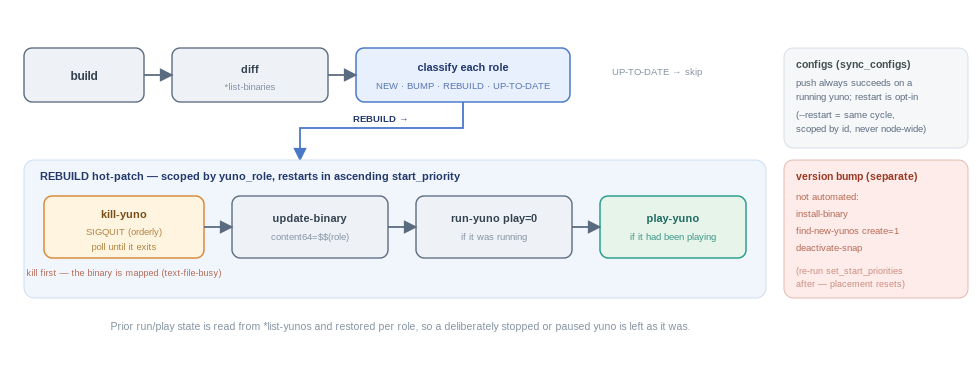
The REBUILD hot-patch, scoped by yuno_role. Kill first — the running binary
is mapped, so update-binary would hit text-file-busy otherwise.
kill-yuno yuno_role=<role>     # only if running; SIGQUIT (orderly), so the
                               # gbmem shutdown audit runs
   ↳ poll *list-yunos until the process exits (else text-file-busy again)
update-binary id=<role> content64=$$(<role>)
run-yuno yuno_role=<role> play=0   # only if it had been running
play-yuno yuno_role=<role>         # only if it had been playing
Prior run/play state is read from *list-yunos and restored per role, so a
deliberately stopped or paused yuno is left as it was, and a role with several
instances across realms is handled in one shot (the role-scoped commands act on
every instance — they all share the one slot). Pass --no-restart to keep the
old print-only-reminder behavior.
When several roles are pushed at once the restarts run in ascending
start_priority order (read from the agent via *list-yunos), so a REBUILD
brings infrastructure (logcenter/emailsender/auth_bff) back before gates and dba
instead of alphabetically. It degrades to the previous order when the agent has
no start_priority yet. See set-start-priorities.
The version-bump path is still not automated: after an install-binary
the script prints the find-new-yunos create=1 + deactivate-snap reminder
(yunetas upgrade-yunos runs them). Up to 7.28.10 deactivate-snap bounced
the whole node. Since 7.28.11 it restarts only the yunos whose launch changed
(after 7.29.1, compared with what each yuno was launched with, so an
update-config of the version in use reaches it).
The exit code is 1 when a push failed, or when the restart of a yuno that
the script stopped failed (since CLI 0.22.0). yunetas sync reads it and does
not push the configs after a failed binaries pass.
See Yuno lifecycle §6.
Usage¶
yunetas sync-binaries                # interactive: show table, ask, apply
yunetas sync-binaries -n             # dry-run: print the commands, run nothing, ask nothing
yunetas sync-binaries -a             # apply every candidate without asking
yunetas sync-binaries --role gate_x  # only this role (repeatable)
yunetas sync-binaries --no-restart   # REBUILD: update-binary only, no kill/restart
yunetas sync-binaries -u ws://127.0.0.1:1991     # target a specific agent
yunetas sync-binaries -n --node prod             # a registered node
yunetas sync-binaries --yunos-dir /path/to/yunos # override the build dir
--role keeps only the roles you name. Without it, a change to one yuno can
also propose every other binary that differs by a few bytes from the node’s,
because the local SDK is newer (since CLI 0.23.0). A role you name that has
no local build stops the command with an error and exit 2 (since CLI 0.23.3).
See also¶
Deploying yunos step by step — the scenario-driven deploy guide (this script is its push engine for binaries).
Tools — overview of
tools/(build infrastructure + agent scripts).